
- An approved business review. See Verify your business and Go live.
- A bank account in the currency of your balance. See Add a bank account.
- The identity check, done once by an owner or admin in live mode. It starts from Home or Balances when you have money to pay out. See The identity check.
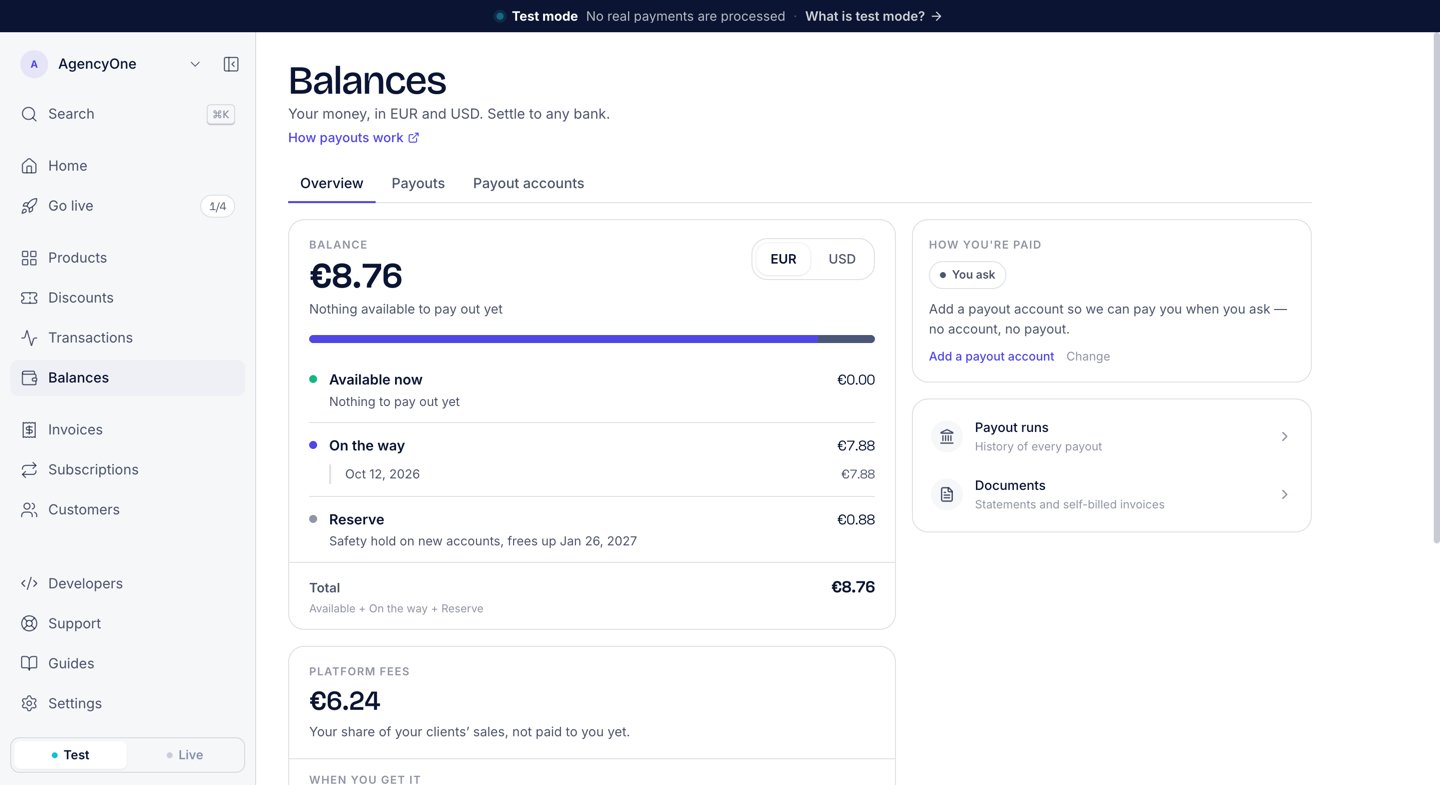
Balances → Overview for a EUR balance: each row, and the Total they add up to.
Your balance
In the dashboard, open Balances. The Overview tab shows your Balance for each currency, split into rows that add up to the Total:
A new sale clears for 14 days before it moves from On the way to Available now.
Where payouts go
Payouts are same-currency. A EUR balance pays to a EUR account and a USD balance pays to a USD account, so no currency conversion happens inside a payout.Bank account
Paid through our banking partner. For each currency, AgentaOS uses your newest bank account that is ready for payouts.
Stablecoin wallet
Public preview. EUR pays out in EURC and USD pays out in USDC, to a wallet you choose per currency.
Schedule
Payouts run in two windows each month: the 1st and the 15th. On the Payouts tab, the Payout schedule section has two options:- Automatic: “Paid automatically every window (1st & 15th).” Set a Minimum payout. Below that amount, AgentaOS holds your balance for the next window.
- You ask: “Queued for the next window when you request it.” Click Request payout. The next window pays what is available at that time, including sales that clear before then.
Fees
Each payout carries a Payout fee of 1% of the amount paid out, with a minimum of €1 or $1. The route adds its own cost:- Bank transfer fee: what our banking partner charges for the transfer, passed through at cost. It depends on the country and currency. See the payout fee table on Supported countries.
- Wallet corridor fee: for a stablecoin payout. See Stablecoin payouts.
Documents for each payout
Every payout gets two documents on the Payouts tab:- Payout statement: “What was paid this run: the covered sales, our commission, the payout fee, the bank transfer fee, and what reached your bank.” Use it to match the payout to your bank statement.
- Self-billed invoice: your supply to AgentaOS, one line per sale that the payout covers, with the fees deducted beneath. The total is what reached your account. It shows no VAT line: it records the value of your supply to AgentaOS (Aristokrates OÜ, Estonia).
FAQ
Which currencies can I be paid in?
Which currencies can I be paid in?
EUR and USD. Each currency pays out to an account in the same currency.
Why was my payout not sent?
Why was my payout not sent?
Check four things. Your account must be verified. You must have a bank account in that currency, or a wallet that you chose for that currency. Your available balance must be at least the minimum payout. On You ask, you must request the payout.
Can I be paid to a bank account and a wallet?
Can I be paid to a bank account and a wallet?
Yes, per currency. For example, EUR can pay out to your bank and USD to a wallet. See Stablecoin payouts.
Does a dispute change my payout?
Does a dispute change my payout?
Yes. The money from a disputed sale moves to Paused (disputed) and is not paid out until the dispute ends.
Next steps
Add a bank account
Save the bank account AgentaOS pays you to.
Supported countries
Where bank payouts reach, and the payout fee table.
Go live
Verify your account to take live payments and receive payouts.
How merchant of record works
How a payment becomes money in your balance.