
https://app.agentaos.ai/….
The Checkouts tab on the Products page lists every checkout with its status: Open, Completed, or Expired.
The buyer’s checkout
The hosted checkout has two steps. The order summary stays on the left: the product, the subtotal, the tax, and the total due. Under the summary, the page states Sold by AgentaOS, merchant of record.Step 1: Your details
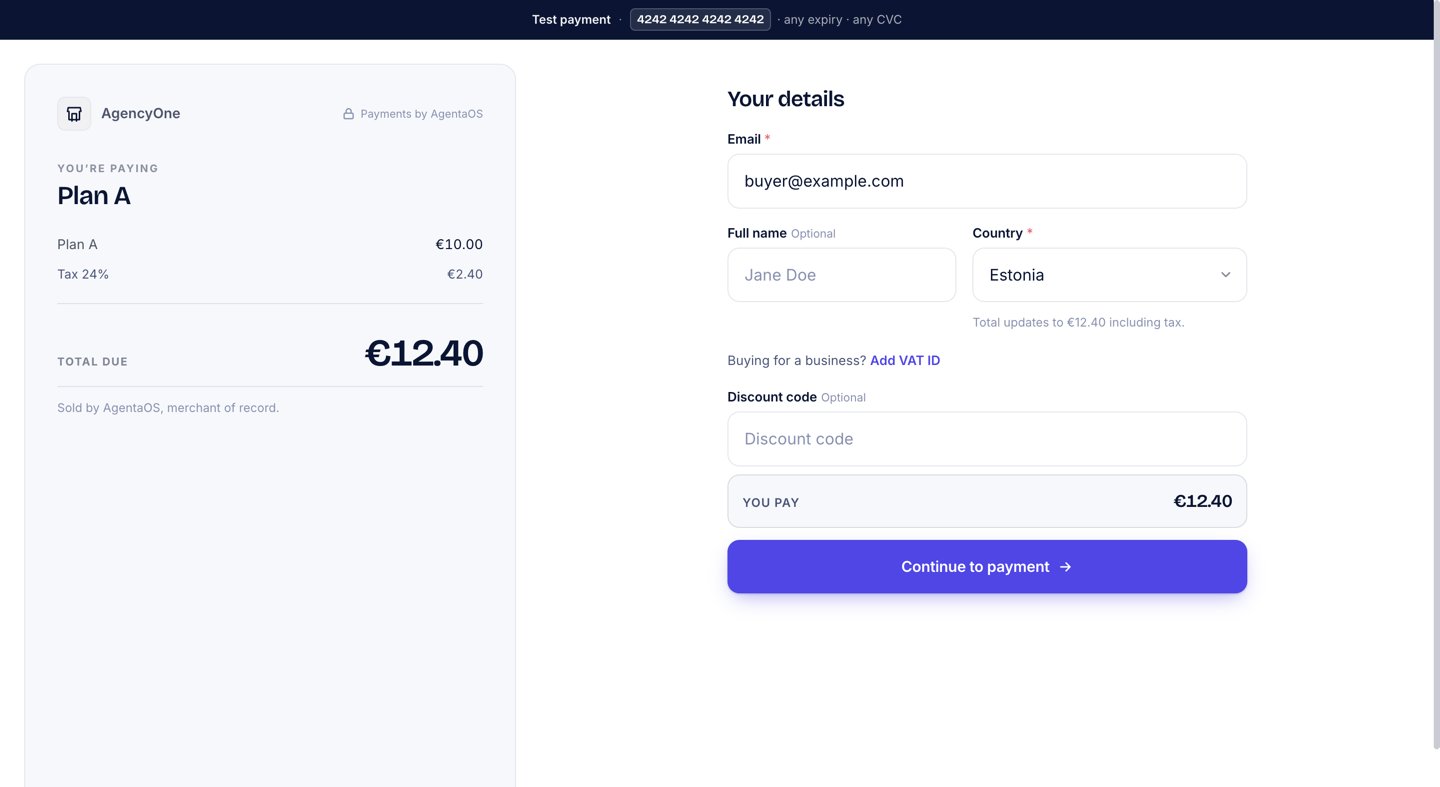
The Your details step. The country sets the tax, and a business buyer can add a VAT ID.
- Email, required. The receipt goes to this address.
- Full name, marked Optional.
- Country, required. The hint under it reads “Used to calculate tax on this purchase.” After the buyer picks a country, the hint shows the new total, such as “Total updates to €12.40 including tax.” For a country outside the scope of VAT, it reads “No tax for this country. Total stays the list price.”
- Buying for a business? Add VAT ID, a link that opens the VAT ID field. A valid EU VAT ID from another EU country is checked live, and reverse charge (0% VAT) applies only after that check passes.
- Discount code, optional. See Discount codes.
Step 2: Review & pay
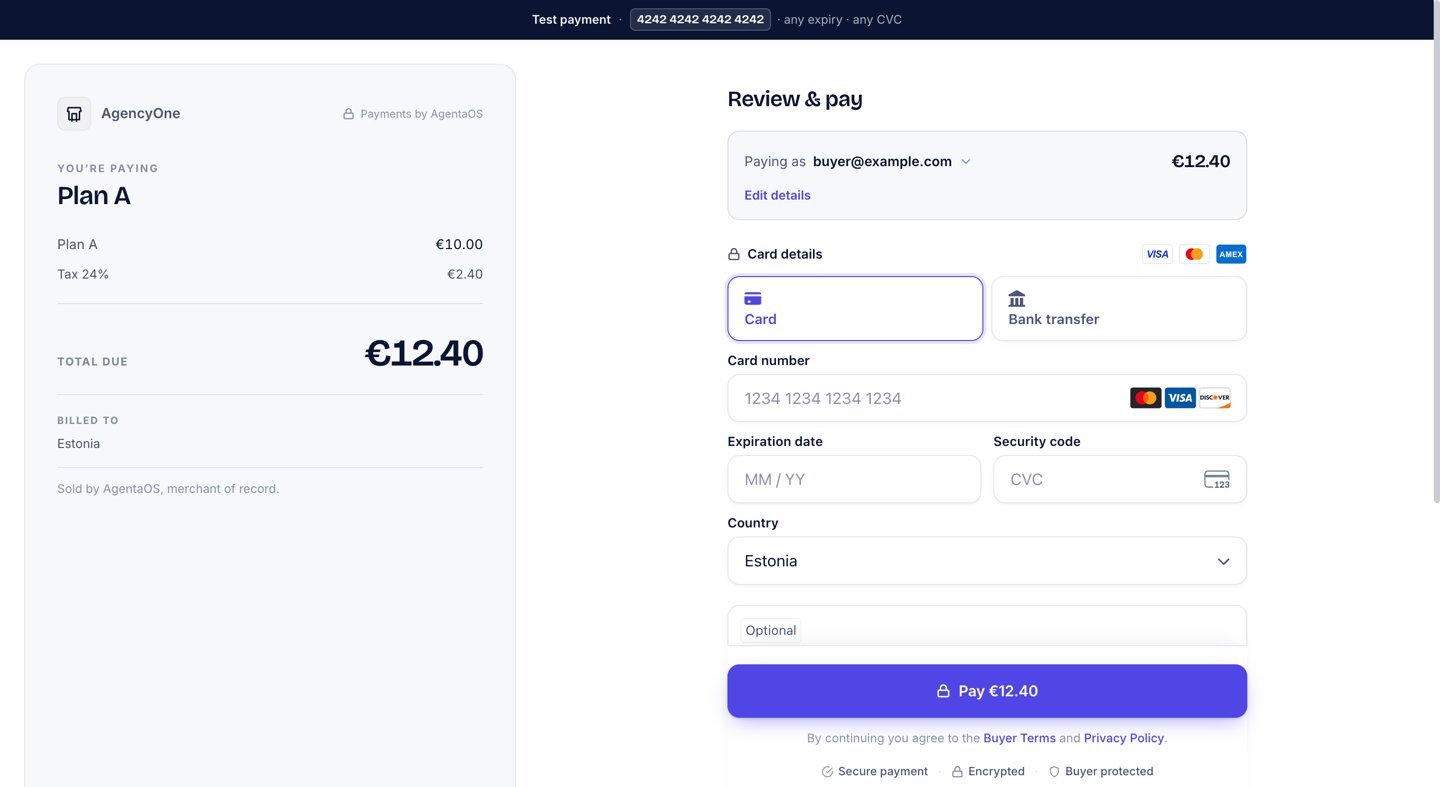
The Review & pay step. The order summary on the left states Sold by AgentaOS, merchant of record.
Test mode
A test-mode checkout shows a banner at the top: Test payment · 4242 4242 4242 4242 · any expiry · any CVC. Click the card number to copy it, then paste it into the card field. See Test mode and testing.Create a checkout from your server
Sharing the buyer link is enough for most sales. Create a checkout from your server when:- The buyer is logged in to your app, and you must know which of your users paid.
- You want to attach your own data, such as a user ID or an order number, with
metadata. The data comes back in the webhook. - You already have the buyer’s email or country and want to fill them in.
linkId. On the product page, open Building this into your site? and click Copy ID.
- SDK
- cURL
amountOverride to charge a different amount on this checkout only.
Create a checkout without a product
When your server knows the amount, you can create a checkout without a product. This checkout is always a one-time payment. To sell a subscription, use a subscription product and pass itslinkId.
- SDK
- CLI
Fill in the buyer’s details
buyerCountry, the buyer picks the country, and that choice sets the VAT.
Retrieve, list, and cancel
- SDK
- CLI
- cURL
expiresIn seconds, from 300 to 86400. Without it, a card checkout lasts 24 hours, an EUR checkout that offers bank transfer 48 hours, and a stablecoin checkout 30 minutes. At the deadline, a card payment not yet completed is stopped and the buyer sees that the checkout has expired. A bank transfer the buyer chose before the deadline is the exception: its details stay valid and the checkout completes when the money arrives, up to 30 days later. You hear about it from checkout.session.bank_transfer_pending.
Cancelling stops a payment that is not yet complete. If the buyer already paid, the cancel answers 409 with code: "session_already_paid" and you receive checkout.session.completed for that payment. Money sent after a cancel is not booked to you and is not returned automatically: write to us and we refund it to the buyer.
To make a checkout card-only, send paymentMethods: ["card"]. Without it, an EUR checkout also offers bank transfer; every other currency is card only.
The buyer’s email is required on every card and bank-transfer checkout, because we send the receipt and invoice. If you create a checkout without buyerEmail, the checkout page asks the buyer for it.
The full parameter and response reference is in Checkouts (SDK) and agenta pay.
Money model
A plainamount is in currency units (49.99 means €49.99), and a field whose name ends in Minor is an integer in minor units. The full rules are in the money model.
Next steps
Products
Create the product a checkout sells.
Invoices
The invoice every checkout issues.
Embedded checkout
Show the checkout on your own page.
Webhooks
Confirm the payment on your server.