
Private preview Working end to end for the accounts that use it; details can still change. Tell us at contact@agentaos.ai before you rely on it, and we support you directly. See Product release phases.
How a business you manage is priced
Managing businesses is not tied to a plan: platforms work on every plan. A client’s business pays the AgentaOS fees of its own plan, which is pay as you go unless it upgrades. Another app of your own company is priced with you, on your plan. See Pricing.How the share is worked out
The share is a percentage of the sale’s price before VAT, plus a fixed amount per sale. On a €100 sale (before VAT) with a 10% + €0.50 share, you get €10.50.- VAT is left out. We are the merchant of record and remit the VAT; it is never part of your share.
- Our own fee stays on the total paid, as for any sale. See Pricing. The client keeps what remains after our fee and your share.
- The share is fixed on each sale when it is made. Changing it later affects new sales only. Past sales keep the share they were made with.
- Every sale carries it: a one-time sale, each subscription renewal, and each paid invoice.
- The fixed part is in the sale’s currency. A fixed part of 0.50 is €0.50 on a EUR sale and $0.50 on a USD sale.
- The buyer sees nothing of it. The buyer’s invoice and receipt show the product and the price. The share is between you and your client. Your client sees it on each sale page as Platform fee with your name, for example Platform fee (AgencyOne).
Set the share
The share is set in the dashboard only. There is no API for it. You can set it before the client is verified; the fees then wait, as described under When you are paid. Your client cannot change or refuse the share: only you set it.1
Open your businesses
Settings → Business → Businesses you manage.
2
Set share
Click Set share on the business, enter the percentage and the fixed amount. The editor shows what the client keeps on an example sale, after our fee and yours.
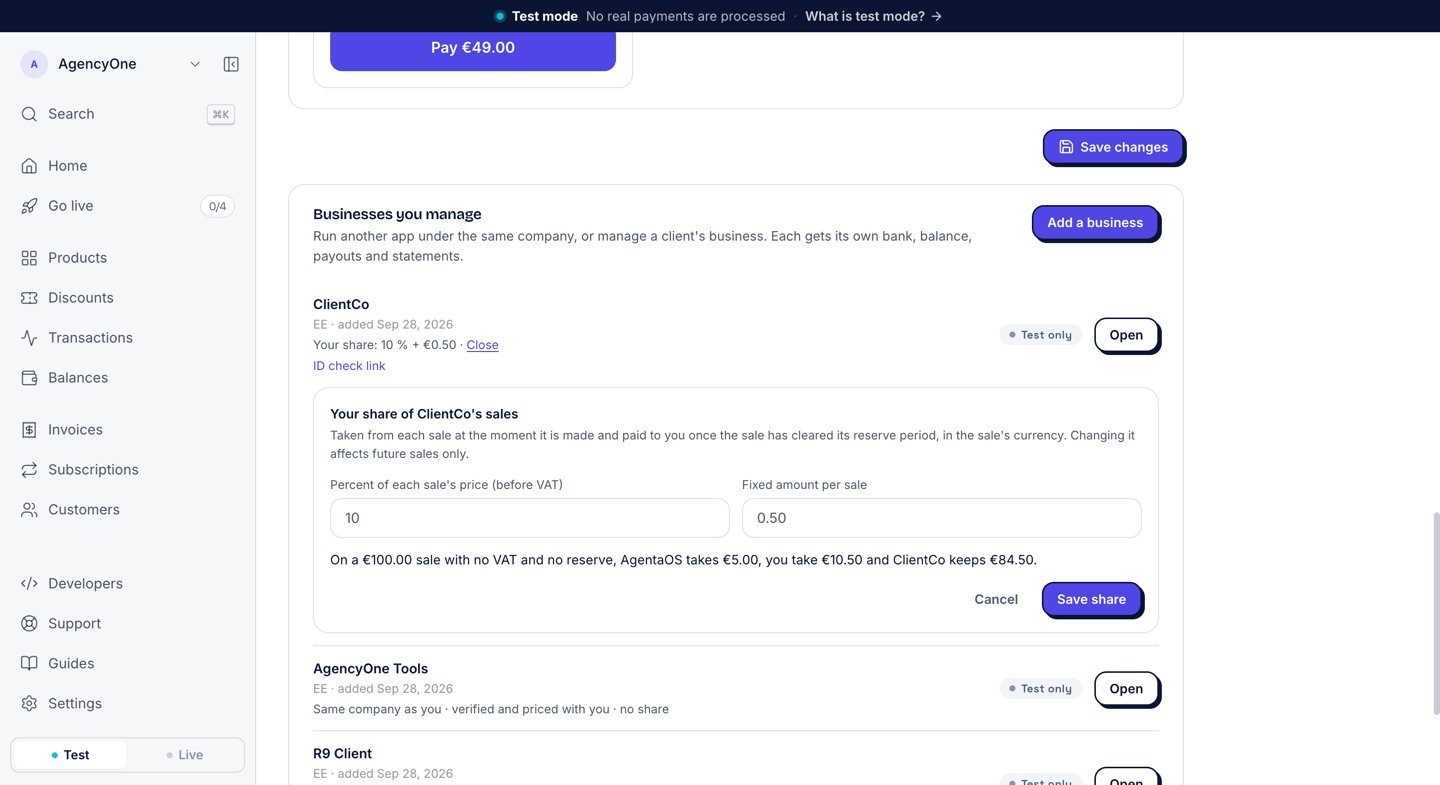
The share editor shows what the client keeps on an example sale.
platformFee ({ bps, fixedMinor }: basis points, where 1000 is 10%, and the fixed part in minor units). With no share set, it is { bps: 0, fixedMinor: 0 }, never null. See Business fields.
When you are paid
Your share is paid to you with your own payout, once that sale’s reserve period ends: 120 days after the sale, unless the client’s account has a different reserve period. The client’s own money from the sale clears sooner, 14 days after the sale. The Platform fees card on your Balances page shows the date for each share. Platform fees ride in the same payout as your own sales: one payout per currency. The 1% payout fee applies to the whole payout, fees included. See Payouts. The client must be in good standing at that point: verified, and not on hold. A share from a client that is not yet verified waits until they are. A payout that contains only platform fees gets no self-billed invoice. The section Platform fees collected on its payout statement is the record of that income. See Payout statements.Refunds, disputes and holds
- Refund. The buyer gets the money back. If you already received your share of that sale, you return it. A share not yet paid to you is dropped.
- Lost chargeback. We take back the share that was paid to you for that sale. A share not yet paid to you is dropped.
- Hold. If we put a client on hold after it went live, its fees wait until we resume it. Fees you already received are not taken back because of a hold.
See what is coming
The Platform fees card is on the Balances page, in the Overview tab. It shows one line per day for the next five days, soonest first, then one Later line. A day where the client is not yet in good standing says it is paid once that client is verified. For a quick total per business,feesThisMonth on each business gives your share of its live sales this month, per currency, ready to show.
Next steps
Platforms
What a platform is, and who does what.
Payouts
How your balance moves before it pays out.