Create a product in the dashboard, share its buyer link, pay it yourself in test mode, and see the sale, the VAT, and your net. No code.
This guide takes you from no product to a first sale in the dashboard. You create a product, pay for it yourself as a test buyer, and then find the sale, the invoice, and your net amount. Everything runs in Test mode, so no real money moves.The full product settings are on the Products page. The buyer’s checkout, field by field, is on the Checkouts page.
In the sidebar, click Products, then click New product. The form opens with the title Create a new product.
2
Name it
Under Details, type a Product name, for example Starter guide, and a Description. The buyer sees both on the checkout.
3
Set the price
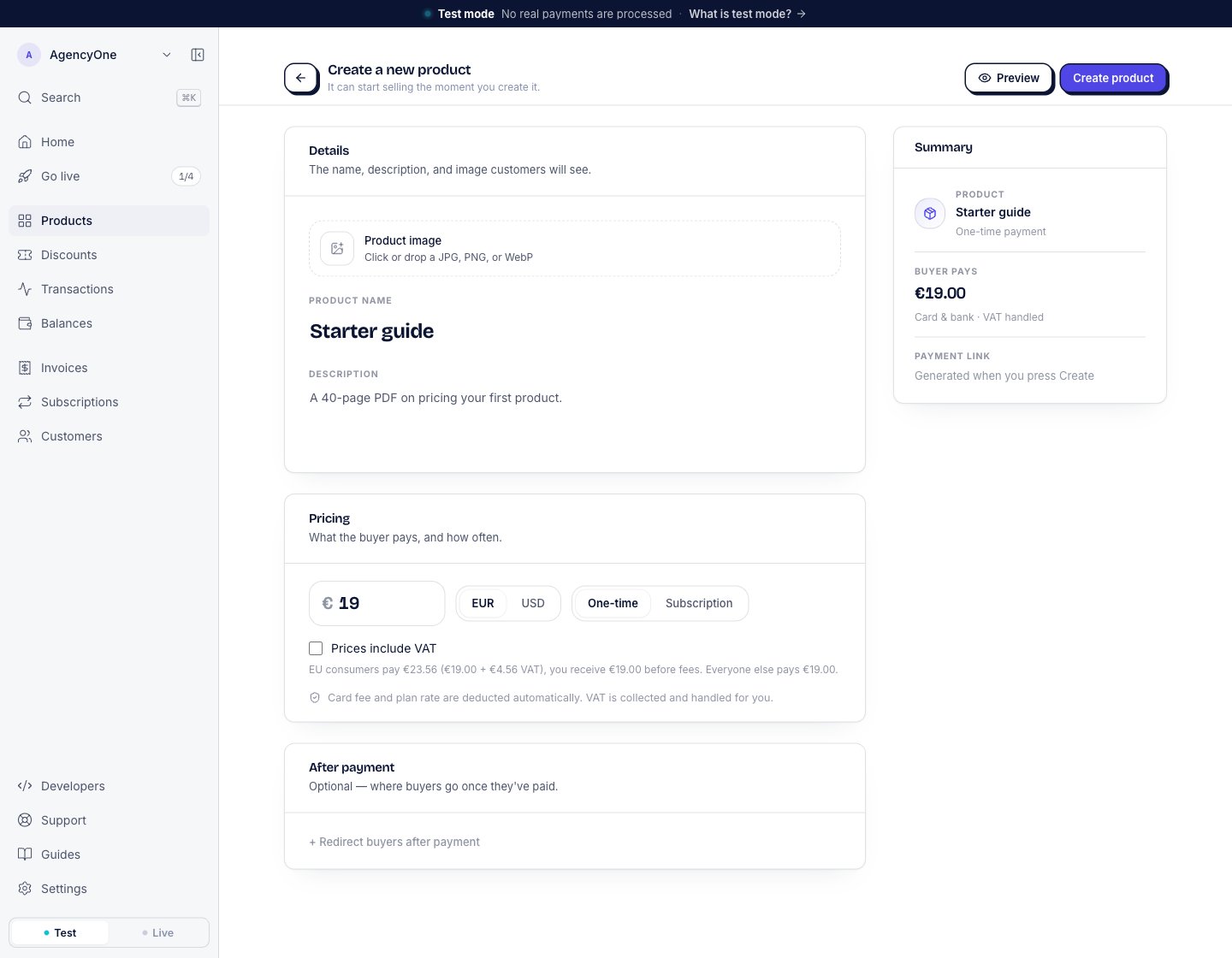
Under Pricing, type the price, for example 19, and pick EUR or USD. Leave One-time selected.Under the price, the form shows what a buyer pays with VAT. For a €19 product, it reads “EU consumers pay €23.56 (€19.00 + €4.56 VAT), you receive €19.00 before fees. Everyone else pays €19.00.” Select Prices include VAT if your price already contains the VAT.
The form for a one-time product at €19. The line under the price shows what a buyer pays with VAT.
4
Create it
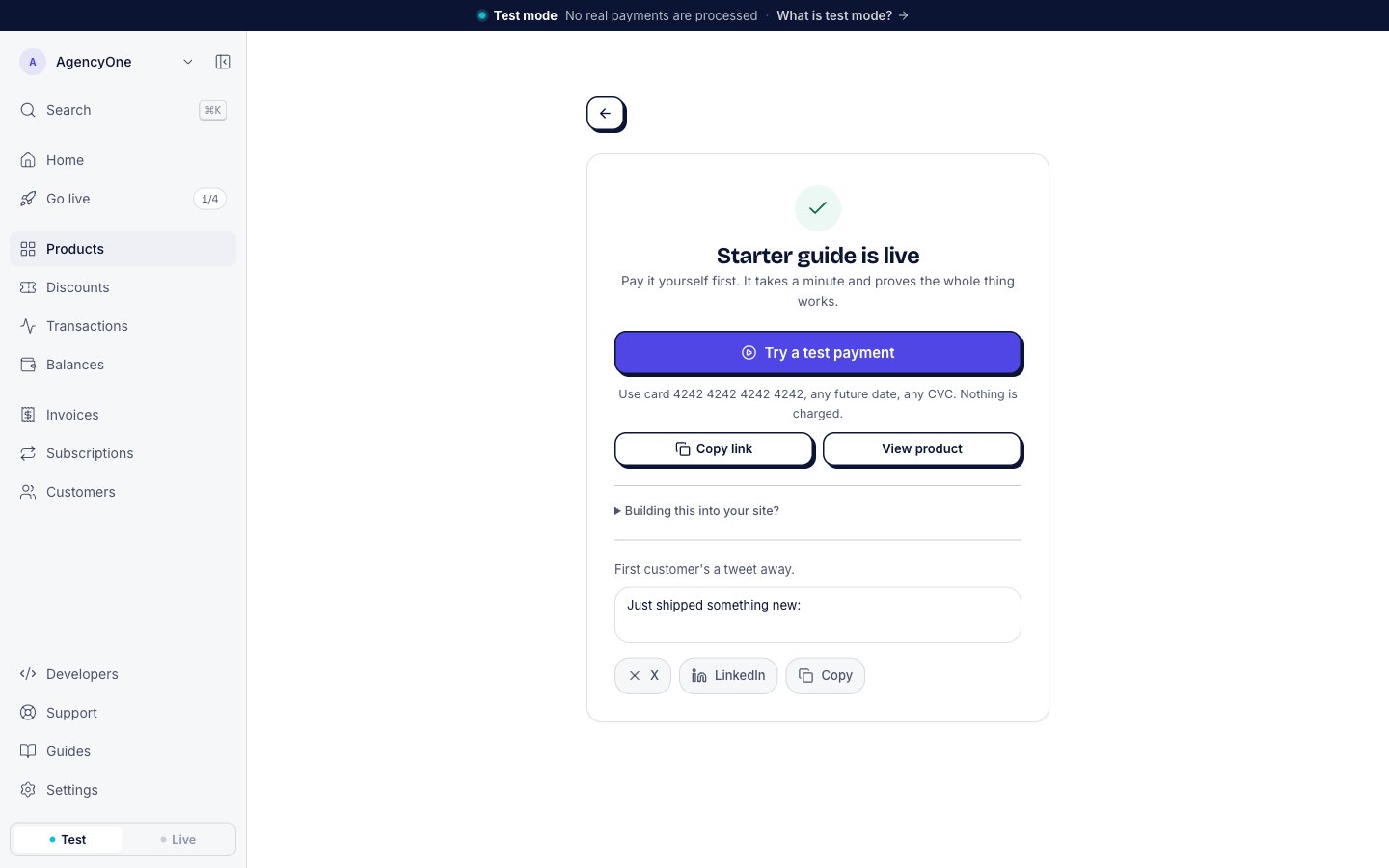
Click Create product. The next screen says “Starter guide is live”. Live here is the product’s word for published. You are still in test mode.
The screen after you create the product, in test mode.
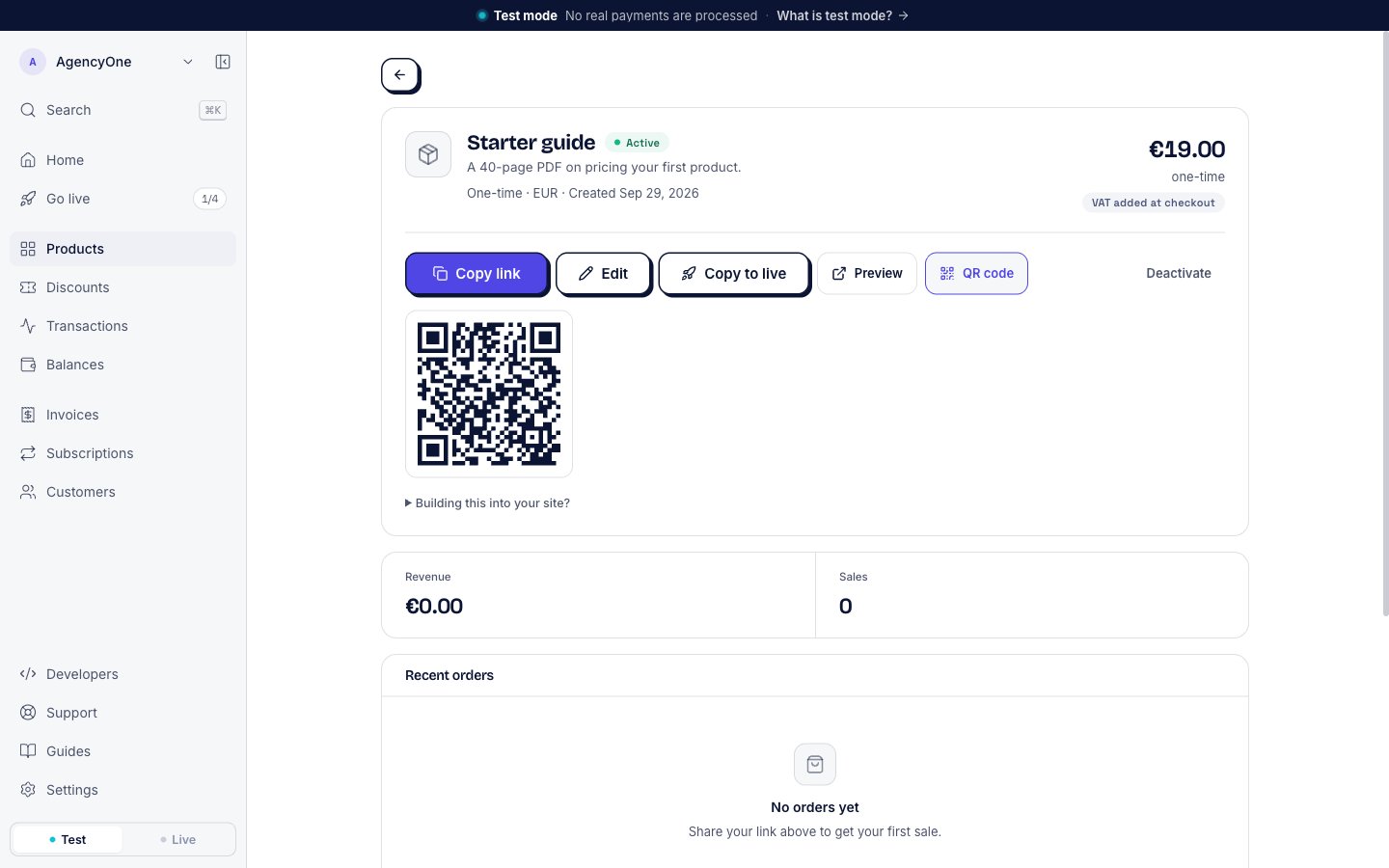
Click Preview on the product’s page, or Try a test payment on the screen after you create the product. The checkout opens. A banner at the top reads Test payment · 4242 4242 4242 4242 · any expiry · any CVC.
1
Fill in the buyer details
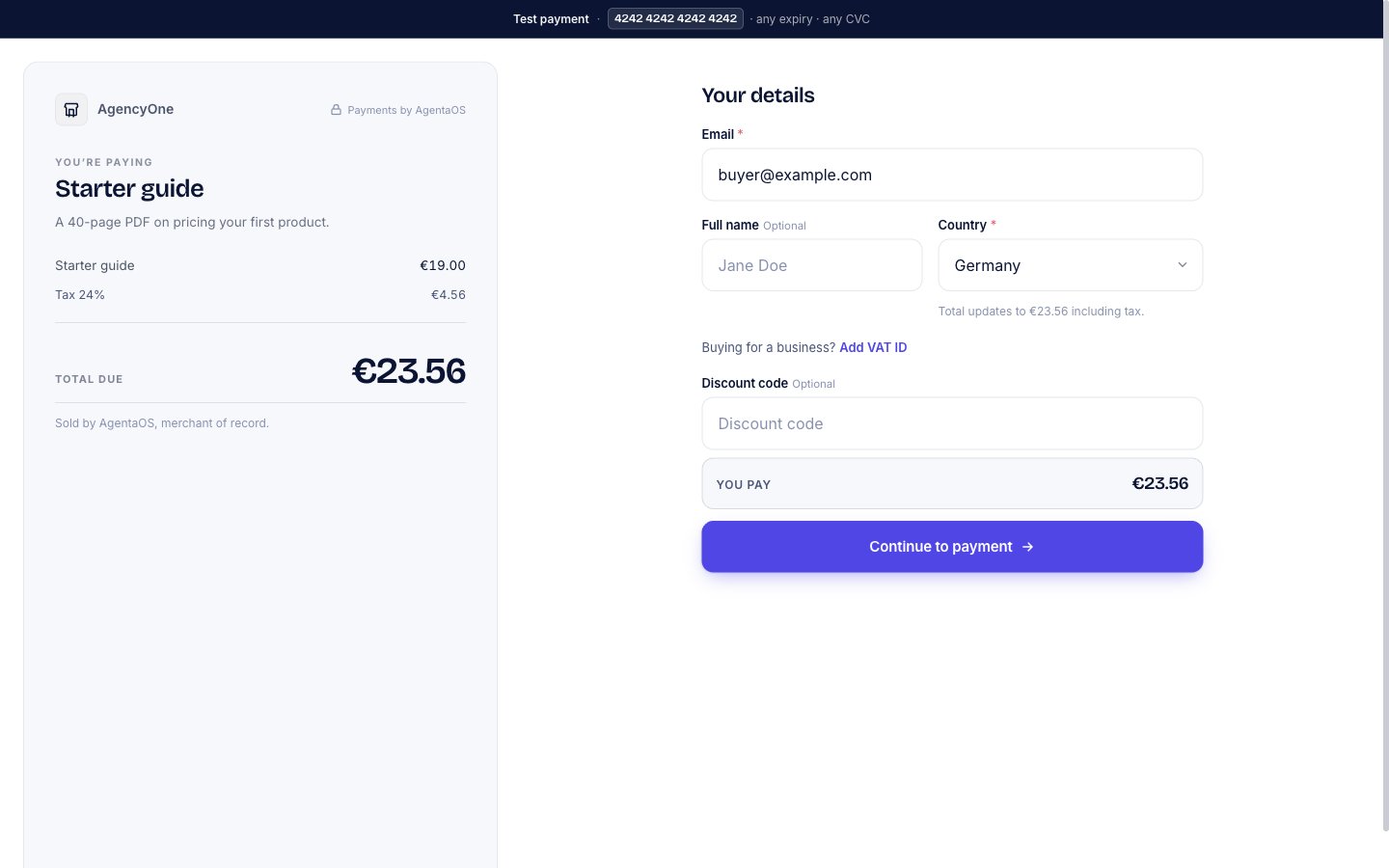
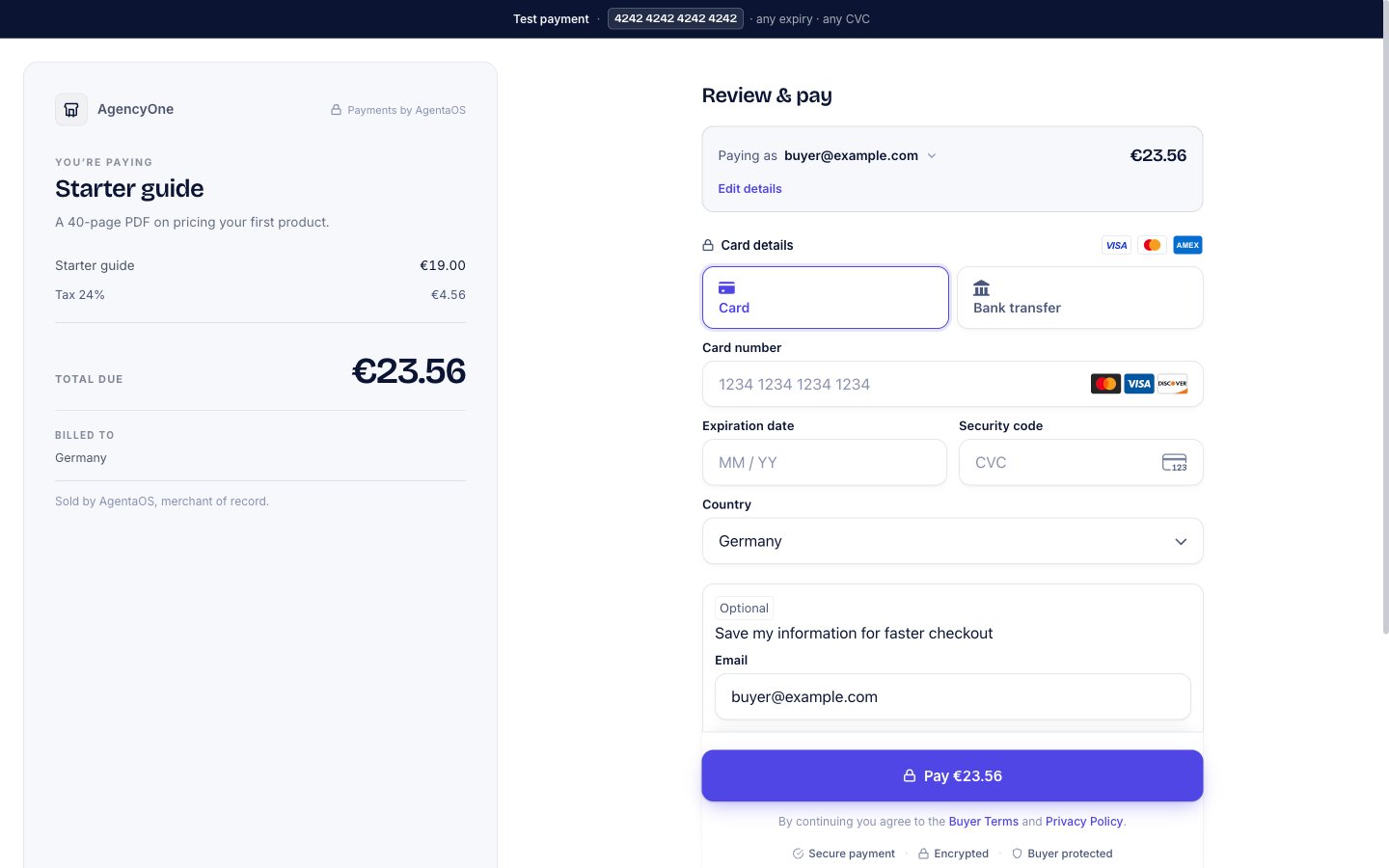
Type an email such as buyer@example.com and pick a Country. The order summary on the left adds the tax for that country and shows the Total due.
The first checkout step, with a buyer in Germany.
The 24% is the Estonian rate. The checkout charges it to every EU consumer while AgentaOS sells under the EU distance-selling threshold. See How tax works.
2
Continue to payment
Click Continue to payment.
3
Enter the test card
Type 4242 4242 4242 4242 in Card number, any future date in Expiration date, and any three digits in Security code.
The Review & pay step, before the card is entered.
4
Pay
Click Pay followed by the amount, here Pay €23.56.
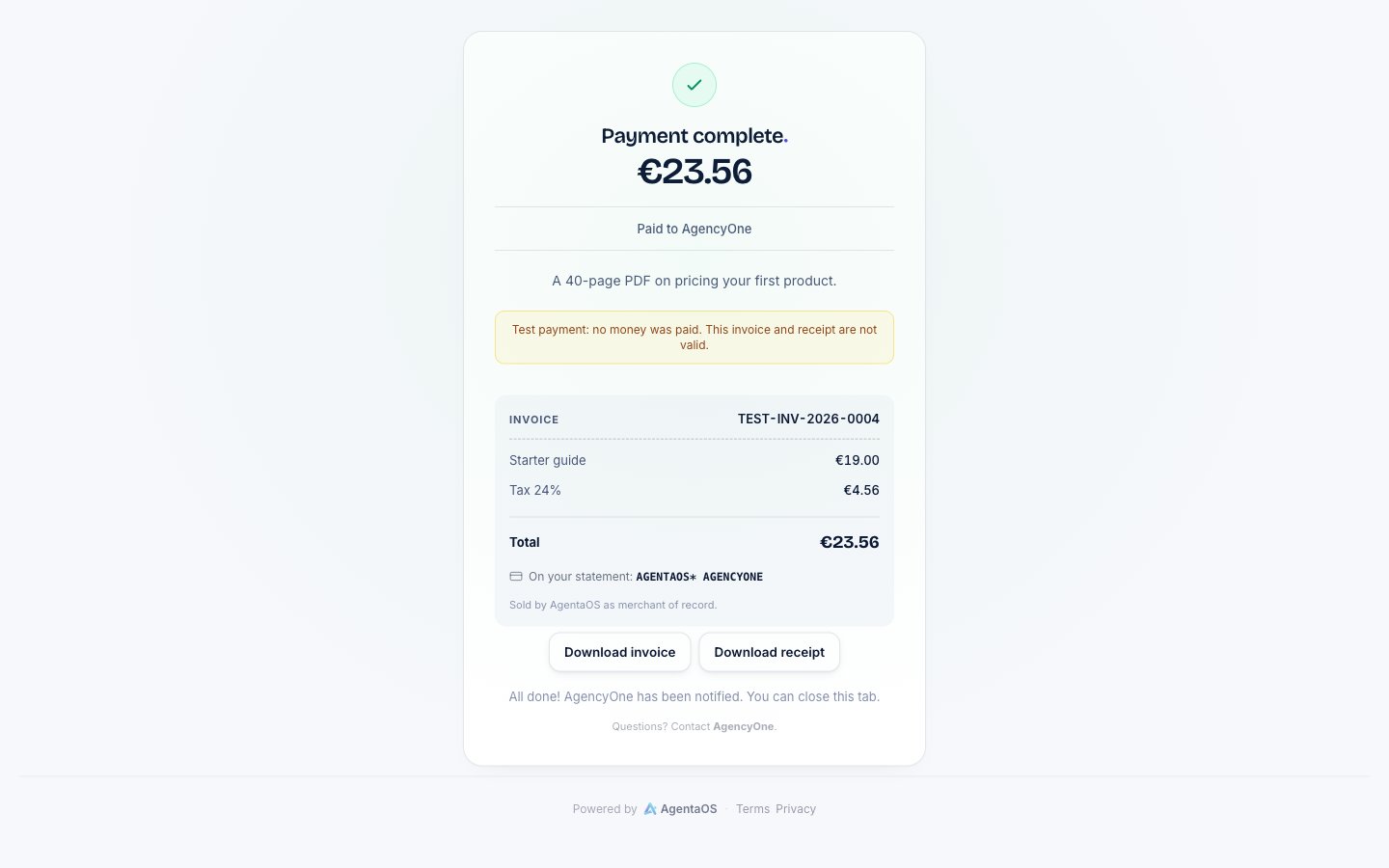
The checkout shows Payment complete with the amount, the invoice number, and the lines of the invoice. In test mode, it also says “Test payment: no money was paid. This invoice and receipt are not valid.” The buyer can click Download invoice or Download receipt.
What the buyer sees after paying.
The buyer also gets a receipt by email, with the invoice attached. The subject line is “Receipt from” followed by your business name. In test mode, the subject starts with [TEST], and the invoice number starts with TEST-. See Test mode and testing for how each test document is marked.
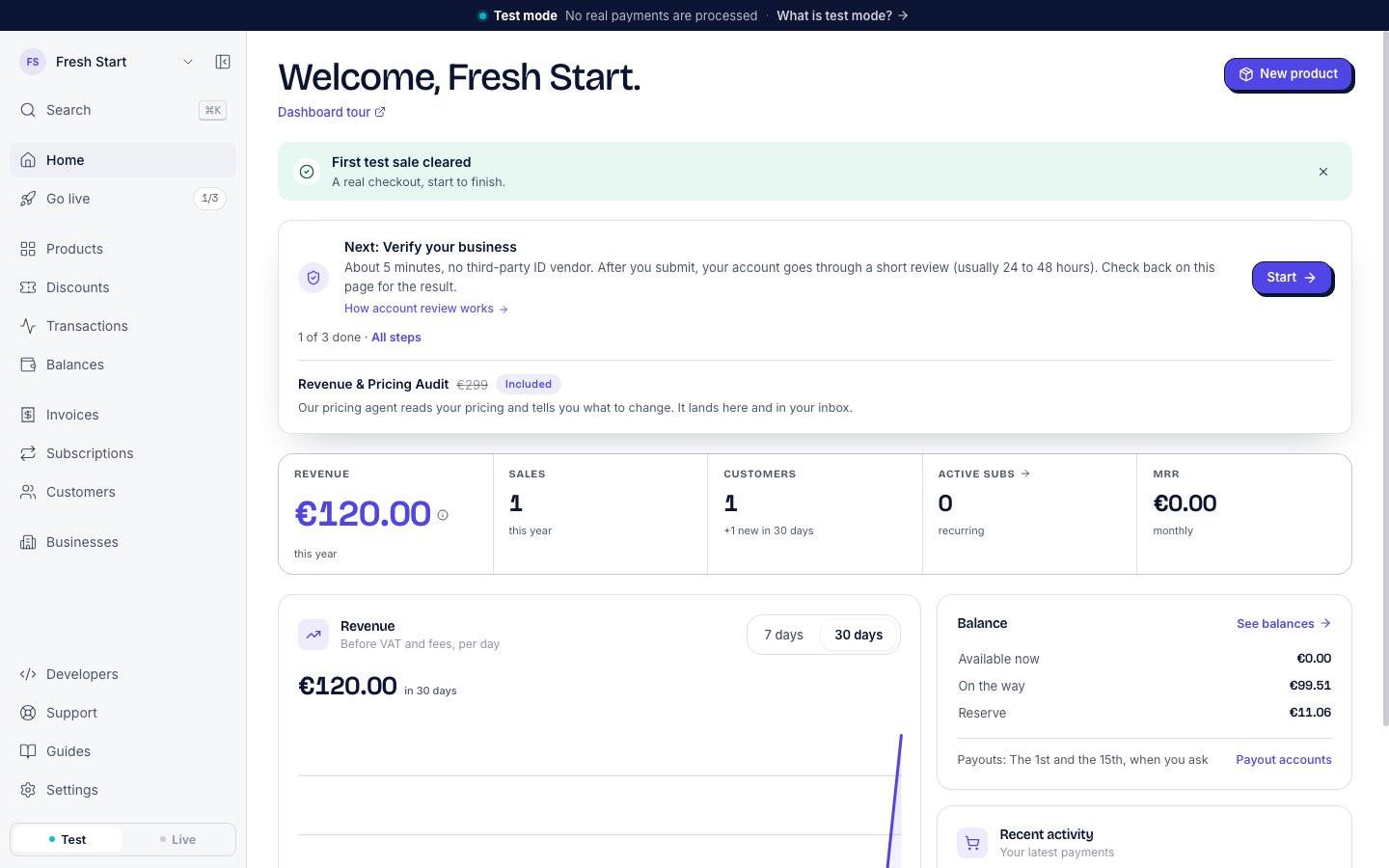
In the sidebar, click Home. A strip at the top says “First test sale cleared”, and the card under it moves on to Verify your business, with 1 of 3 done.
Home after the first test payment.
2
Transactions
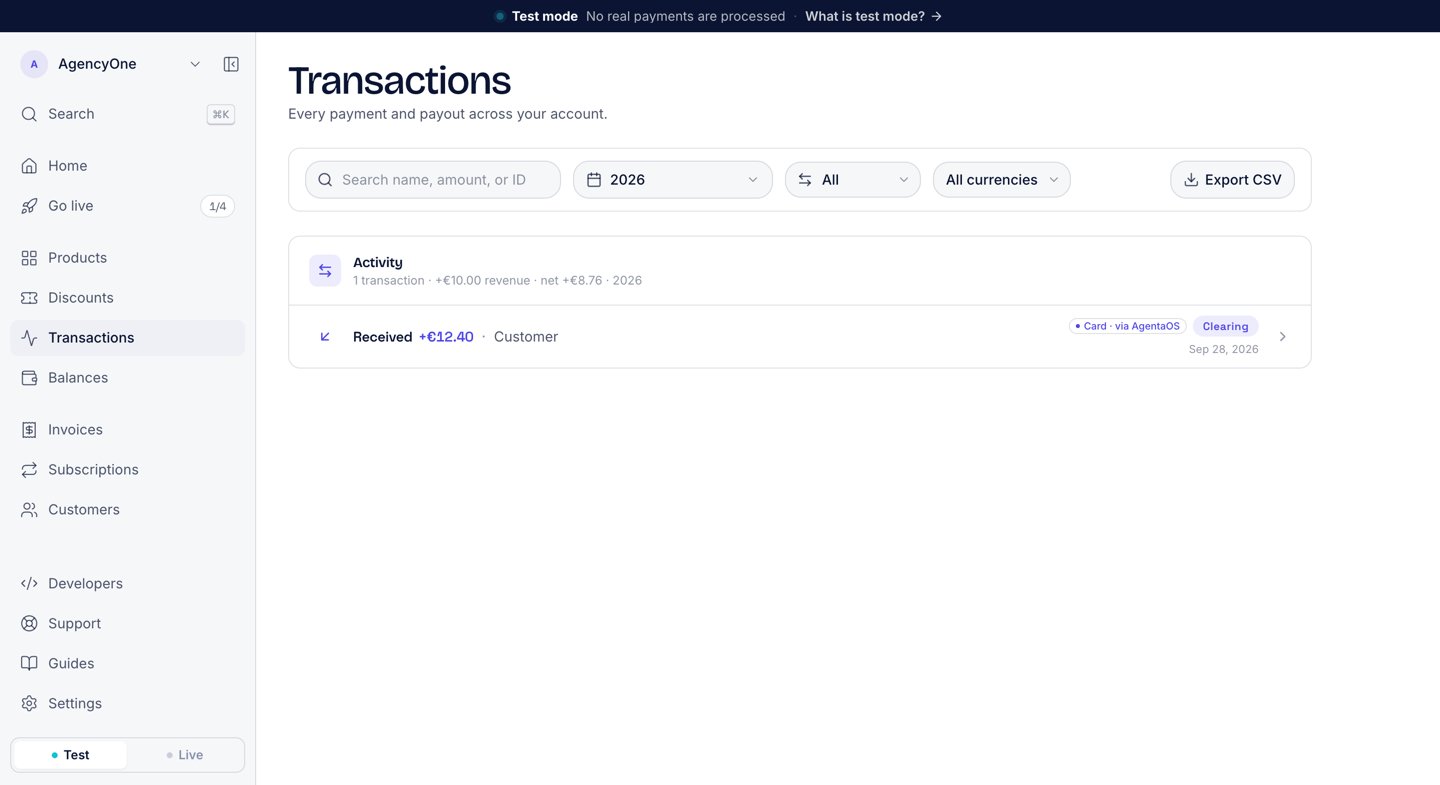
Click Transactions. The sale is at the top of the list as Received with the amount the buyer paid. The image below shows an earlier test sale of €12.40.
The Transactions list with an earlier test sale of €12.40.
3
The sale page
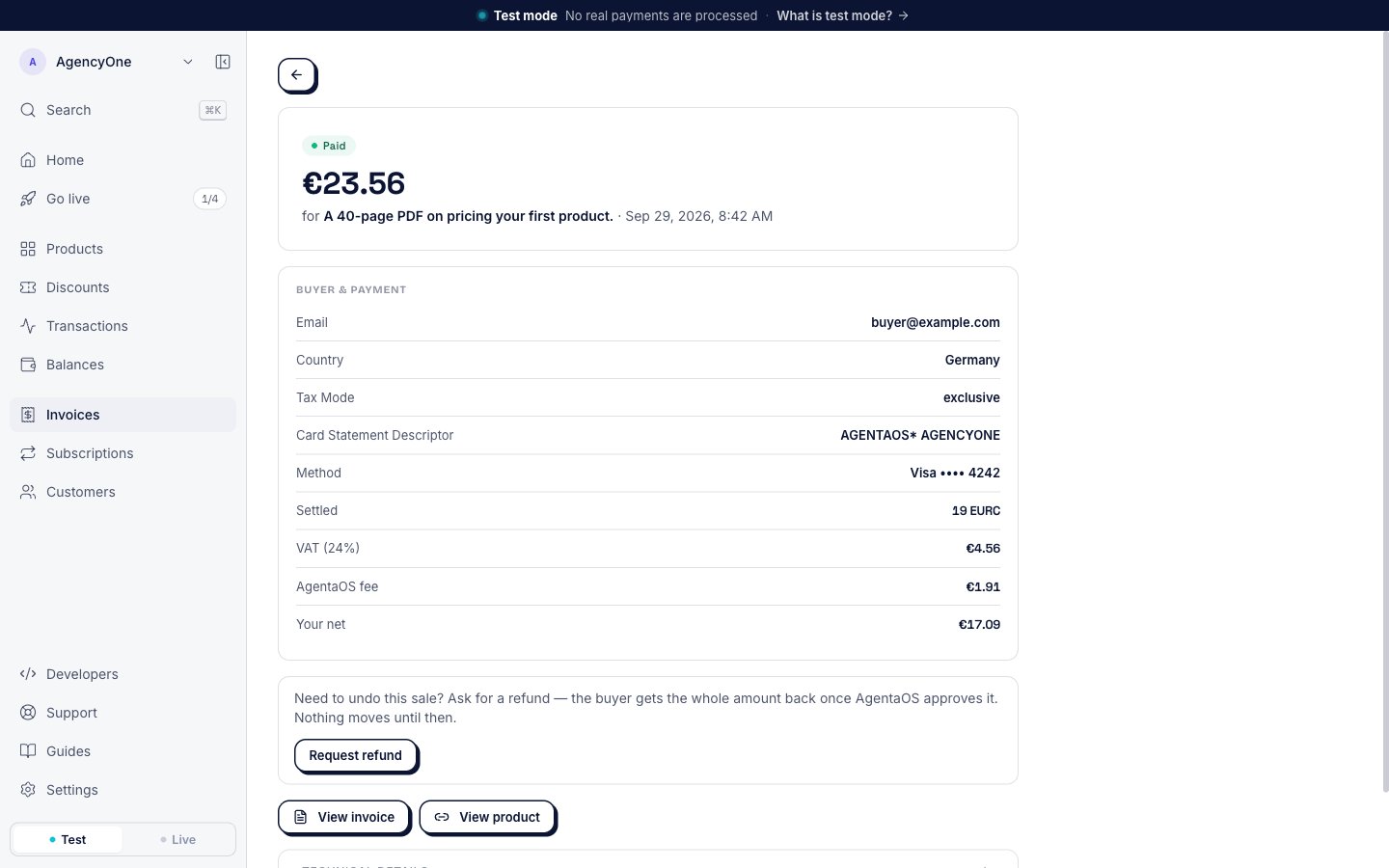
Click the sale to open it. Under Buyer & payment, three rows show where the buyer’s money goes:
VAT is the tax on the sale. AgentaOS collects and handles it.
AgentaOS fee is the fee for the sale. See Pricing.
Your net is what is left for you.
The sale page. VAT, AgentaOS fee, and Your net are at the bottom of Buyer & payment.
4
Invoices
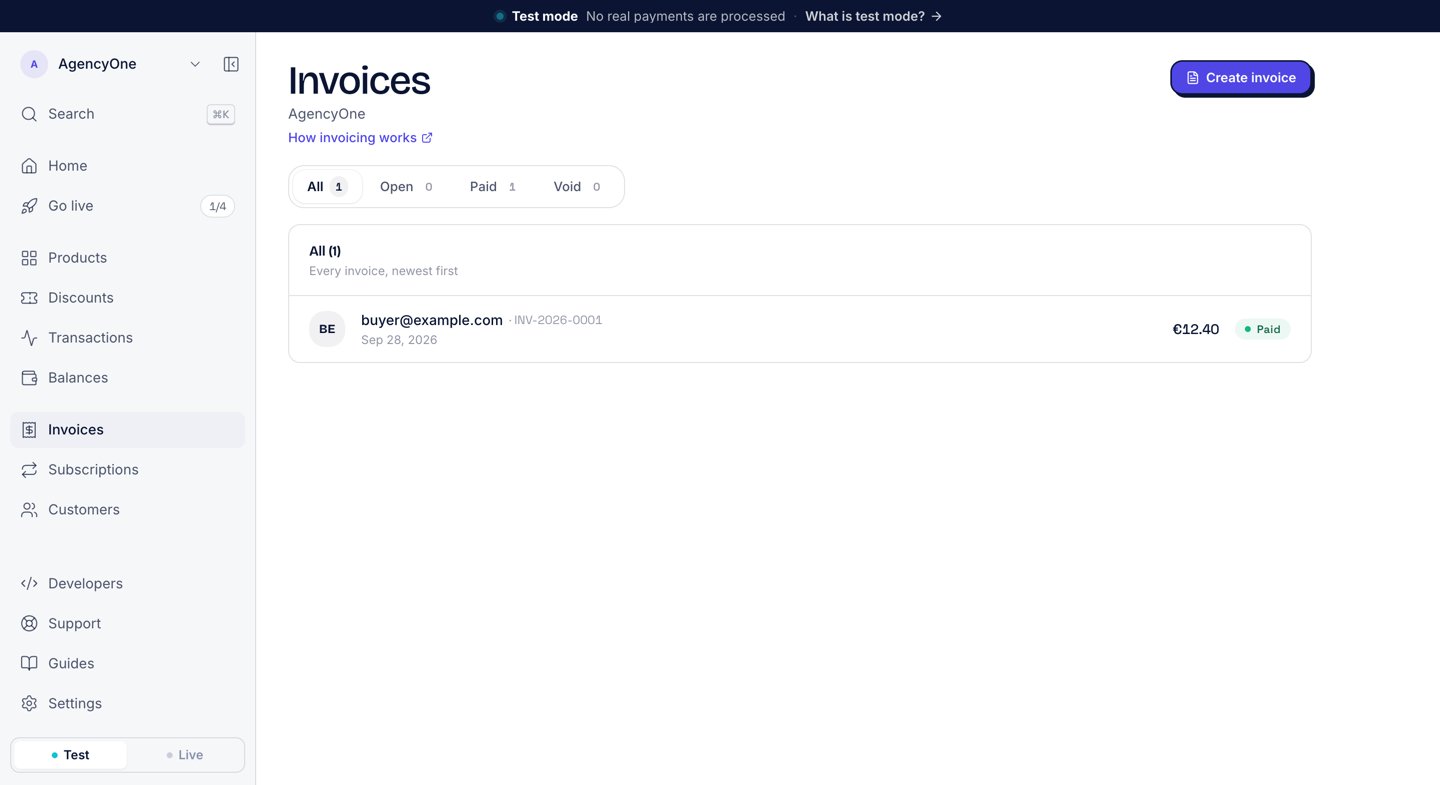
Click Invoices. The sale’s invoice is in the list as Paid, with the buyer’s email. Open it and click Download invoice. The PDF of a test invoice has a TEST badge next to its title. The image below shows the invoice for an earlier test sale of €12.40.
The Invoices list with the invoice for an earlier test sale of €12.40.
Create a monthly plan with a free trial and take your first subscriber.
Go live
Verify your business and take real payments.
Receive webhooks in Express
Let your server react when a buyer pays.
{"docsConfig":{"theme":"aspen","$schema":"https://mintlify.com/docs.json","name":"AgentaOS","colors":{"primary":"#4F46E5","light":"#A5B4FC","dark":"#4338CA"},"logo":{"light":"https://mintcdn.com/agentokratia/m99r4jmD11JEgdx5/images/agentaos-icon.png?fit=max\u0026auto=format\u0026n=m99r4jmD11JEgdx5\u0026q=85\u0026s=0b6178b7724b65d6c92a4e09b7f7f577","dark":"https://mintcdn.com/agentokratia/m99r4jmD11JEgdx5/images/agentaos-icon.png?fit=max\u0026auto=format\u0026n=m99r4jmD11JEgdx5\u0026q=85\u0026s=0b6178b7724b65d6c92a4e09b7f7f577","href":"https://agentaos.ai"},"favicon":"https://mintcdn.com/agentokratia/m99r4jmD11JEgdx5/images/agentaos-icon.png?fit=max\u0026auto=format\u0026n=m99r4jmD11JEgdx5\u0026q=85\u0026s=0b6178b7724b65d6c92a4e09b7f7f577","api":{"openapi":"openapi.json"},"appearance":{"default":"system"},"background":{"decoration":"grid","color":{"light":"#FFFFFF","dark":"#0B1533"}},"navbar":{"links":[{"href":"https://agentaos.ai","label":"Website"}],"primary":{"type":"button","label":"Dashboard","href":"https://app.agentaos.ai"}},"footer":{"socials":{"github":"https://github.com/AgentaOS/agentaos","x":"https://x.com/agentaos","linkedin":"https://linkedin.com/company/agentaos"},"links":[{"header":"Product","items":[{"label":"Pricing","href":"/mor/pricing"},{"label":"Supported countries","href":"/mor/supported-countries"},{"label":"Product release phases","href":"/getting-started/release-phases"}]},{"header":"Developers","items":[{"label":"API reference","href":"/api-reference/introduction"},{"label":"SDK","href":"/sdk/pay-overview"},{"label":"CLI","href":"/cli/install"},{"label":"Changelog","href":"/changelog/overview"}]},{"header":"Company","items":[{"label":"Website","href":"https://agentaos.ai"},{"label":"Support","href":"mailto:contact@agentaos.ai"},{"label":"Why was I charged?","href":"/for-customers/why-charged"}]}]},"search":{"prompt":"Search docs..."},"fonts":{"heading":{"family":"Bricolage Grotesque"},"body":{"family":"Inter"}},"icons":{"library":"fontawesome"},"styling":{"eyebrows":"section","codeblocks":"system","latex":false},"banner":{"content":"AgentaOS is the Merchant of Record for AI founders. [Sell software globally →](https://agentaos.ai)","dismissible":true},"contextual":{"options":["copy","view","chatgpt","claude"],"display":"header"},"thumbnails":{"appearance":"dark"},"navigation":{"global":{"anchors":[{"anchor":"llms.txt","icon":"file-lines","href":"/llms-full.txt"},{"anchor":"Support","icon":"life-ring","href":"mailto:contact@agentaos.ai"}]},"pages":[]}},"deployment":{"deploymentMetadataValue":{"subdomain":"agentokratia","hasAudioNarration":false,"actualSubdomain":"agentokratia","customDomains":["docs.agentaos.ai"],"gitSource":{"type":"github","owner":"agentaos","repo":"docs","deployBranch":"main","contentDirectory":"","isPrivate":true,"mountPath":"","label":""},"chroma":{"liveDeploymentHistoryId":"6ae7c2fe766ca8399e8318b9","collectionId":"f7864f24-4a21-4b63-84a1-60f0d36515da","schemaVersion":"v3","latestBuiltDeploymentHistoryId":"6ae7c2fe766ca8399e8318b9"},"entitlements":{},"buildId":"6ae7c2fe766ca8399e8318b9","clientVersion":"0.0.4067","searchFilterCounts":[{"language":"default","tag":"Reference","count":75},{"language":"default","tag":"API Reference","count":51},{"language":"default","tag":"Documentation","count":38},{"language":"default","tag":"SDK","count":13},{"language":"default","tag":"Guides","count":12},{"language":"default","tag":"CLI","count":11},{"language":"default","tag":"Invoices","count":8},{"language":"default","tag":"Subscriptions","count":8},{"language":"default","tag":"Sell","count":8},{"language":"default","tag":"Payouts","count":7}]},"assistantConfig":{"enableAskAiButton":false,"enableStarterQuestions":false,"enableAskAiSearchBar":true},"basePath":"","hasChatPermissions":false,"hasWebMcpPermissions":false,"toggles":[{"name":"kill-isr","enabled":true,"variant":{"name":"disabled","enabled":false,"feature_enabled":true},"impressionData":false},{"name":"agent-mintlify-slack","enabled":true,"variant":{"name":"disabled","enabled":false,"feature_enabled":true},"impressionData":false},{"name":"agent-integrations-settings","enabled":true,"variant":{"name":"disabled","enabled":false,"feature_enabled":true},"impressionData":false},{"name":"rbac-expansion","enabled":true,"variant":{"name":"disabled","enabled":false,"feature_enabled":true},"impressionData":false},{"name":"automations-pr-grouping","enabled":true,"variant":{"name":"disabled","enabled":false,"feature_enabled":true},"impressionData":false},{"name":"custom-prefix","enabled":true,"variant":{"name":"disabled","enabled":false,"feature_enabled":true},"impressionData":false},{"name":"analytics-v7","enabled":true,"variant":{"name":"disabled","enabled":false,"feature_enabled":true},"impressionData":false},{"name":"user-flows-analytics","enabled":true,"variant":{"name":"disabled","enabled":false,"feature_enabled":true},"impressionData":false},{"name":"no-publish-flow","enabled":true,"variant":{"name":"disabled","enabled":false,"feature_enabled":true},"impressionData":false},{"name":"workos-onboarding","enabled":true,"variant":{"name":"disabled","enabled":false,"feature_enabled":true},"impressionData":false},{"name":"llms-txt-v2","enabled":true,"variant":{"name":"disabled","enabled":false,"feature_enabled":true},"impressionData":false},{"name":"snapshot-serving-live","enabled":true,"variant":{"name":"disabled","enabled":false,"feature_enabled":true},"impressionData":false},{"name":"stripTemperatureMiddleware","enabled":true,"variant":{"name":"disabled","enabled":false,"feature_enabled":true},"impressionData":false},{"name":"support-platform-pylon-zendesk","enabled":true,"variant":{"name":"disabled","enabled":false,"feature_enabled":true},"impressionData":false},{"name":"snapshot-serving","enabled":true,"variant":{"name":"disabled","enabled":false,"feature_enabled":true},"impressionData":false},{"name":"instant-rollback","enabled":true,"variant":{"name":"disabled","enabled":false,"feature_enabled":true},"impressionData":false},{"name":"granular-notifications-server","enabled":true,"variant":{"name":"disabled","enabled":false,"feature_enabled":true},"impressionData":false},{"name":"granular-notifications","enabled":true,"variant":{"name":"disabled","enabled":false,"feature_enabled":true},"impressionData":false},{"name":"automations-fable","enabled":true,"variant":{"name":"disabled","enabled":false,"feature_enabled":true},"impressionData":false},{"name":"fixed-ai-action-pricing","enabled":true,"variant":{"name":"disabled","enabled":false,"feature_enabled":true},"impressionData":false},{"name":"automation-resolve-merge-conflict","enabled":true,"variant":{"name":"disabled","enabled":false,"feature_enabled":true},"impressionData":false},{"name":"scoped-publishing","enabled":true,"variant":{"name":"disabled","enabled":false,"feature_enabled":true},"impressionData":false},{"name":"mintql","enabled":true,"variant":{"name":"disabled","enabled":false,"feature_enabled":true},"impressionData":false},{"name":"page-level-analytics","enabled":true,"variant":{"name":"disabled","enabled":false,"feature_enabled":true},"impressionData":false},{"name":"editor-version-history-v2","enabled":true,"variant":{"name":"disabled","enabled":false,"feature_enabled":true},"impressionData":false},{"name":"billing-page-v2","enabled":true,"variant":{"name":"disabled","enabled":false,"feature_enabled":true},"impressionData":false},{"name":"full-page-search","enabled":true,"variant":{"name":"disabled","enabled":false,"feature_enabled":true},"impressionData":false},{"name":"workspace-projects","enabled":true,"variant":{"name":"disabled","enabled":false,"feature_enabled":true},"impressionData":false},{"name":"assistant-v5","enabled":true,"variant":{"name":"disabled","enabled":false,"feature_enabled":true},"impressionData":false},{"name":"fork-pr-previews","enabled":true,"variant":{"name":"disabled","enabled":false,"feature_enabled":true},"impressionData":false},{"name":"revalidation-jwt","enabled":true,"variant":{"name":"disabled","enabled":false,"feature_enabled":true},"impressionData":false},{"name":"vite-origin","enabled":true,"variant":{"name":"disabled","enabled":false,"feature_enabled":true},"impressionData":false},{"name":"workos-sso-scim","enabled":true,"variant":{"name":"disabled","enabled":false,"feature_enabled":true},"impressionData":false},{"name":"hobby-abuse-scan","enabled":true,"variant":{"name":"disabled","enabled":false,"feature_enabled":true},"impressionData":false},{"name":"dashboard-inbox","enabled":true,"variant":{"name":"disabled","enabled":false,"feature_enabled":true},"impressionData":false},{"name":"workos-signup","enabled":true,"variant":{"name":"disabled","enabled":false,"feature_enabled":true},"impressionData":false},{"name":"turbopuffer-dual-write","enabled":true,"variant":{"name":"disabled","enabled":false,"feature_enabled":true},"impressionData":false},{"name":"workos-enabled","enabled":true,"variant":{"name":"disabled","enabled":false,"feature_enabled":true},"impressionData":false},{"name":"approve-review-flow","enabled":true,"variant":{"name":"disabled","enabled":false,"feature_enabled":true},"impressionData":false},{"name":"sso-setup-deadline-banner","enabled":true,"variant":{"name":"disabled","enabled":false,"feature_enabled":true},"impressionData":false},{"name":"turbopuffer-serve","enabled":true,"variant":{"name":"disabled","enabled":false,"feature_enabled":true},"impressionData":false}],"googleFontsInlined":true},"customCss":[{"filePath":"custom.css","content":"[data-component-part=\"card-icon\"]{background:rgba(79, 70, 229, 0.08);border-radius:0.5rem;padding:0.4rem}.dark [data-component-part=\"card-icon\"]{background:rgba(165, 180, 252, 0.12)}.card{border:1px solid rgba(79, 70, 229, 0.08);transition:all 0.2s ease}.card:hover{border-color:rgba(79, 70, 229, 0.22);box-shadow:0 8px 24px rgba(79, 70, 229, 0.07);transform:translateY(-1px)}.dark .card:hover{box-shadow:0 8px 24px rgba(79, 70, 229, 0.14)}h1{letter-spacing:-0.02em}h2{margin-top:2rem}table th{background:rgba(79, 70, 229, 0.04);font-weight:600}.dark table th{background:rgba(79, 70, 229, 0.10)}table tr:hover{background:rgba(79, 70, 229, 0.02)}pre{border:1px solid rgba(11, 21, 51, 0.08)!important;border-radius:8px!important}#content-area a.link,.prose a.link{color:#4F46E5!important;text-decoration:underline;text-decoration-color:rgba(79, 70, 229, 0.35);text-underline-offset:2px;font-weight:500}#content-area a.link:hover,.prose a.link:hover{text-decoration-color:#4F46E5!important}.dark #content-area a.link,.dark .prose a.link{color:#A5B4FC!important;text-decoration-color:rgba(165, 180, 252, 0.4)}#banner{background-color:#0B1533!important}.preview-pill{display:inline-block;vertical-align:baseline;margin-right:0.35rem;padding:0.1rem 0.55rem;border-radius:9999px;font-size:0.72rem;font-weight:600;letter-spacing:0.02em;line-height:1.4;color:#4338CA;background:rgba(79, 70, 229, 0.12);white-space:nowrap}.dark .preview-pill{color:#C7D2FE;background:rgba(165, 180, 252, 0.16)}.preview-pill-public{color:#047857;background:rgba(16, 185, 129, 0.12)}.dark .preview-pill-public{color:#A7F3D0;background:rgba(52, 211, 153, 0.16)}"}],"page":{"pagePath":"guides/accept-your-first-payment","slug":"/guides/accept-your-first-payment","pageMetadata":{"title":"Accept your first payment","description":"Create a product in the dashboard, share its buyer link, pay it yourself in test mode, and see the sale, the VAT, and your net. No code.","icon":"credit-card","href":"/guides/accept-your-first-payment"},"description":{"compiledSource":"\"use strict\";\nconst {jsx: _jsx} = arguments[0];\nconst {useMDXComponents: _provideComponents} = arguments[0];\nfunction _createMdxContent(props) {\n const _components = {\n p: \"p\",\n ..._provideComponents(),\n ...props.components\n };\n return _jsx(_components.p, {\n children: \"Create a product in the dashboard, share its buyer link, pay it yourself in test mode, and see the sale, the VAT, and your net. No code.\"\n });\n}\nfunction MDXContent(props = {}) {\n const {wrapper: MDXLayout} = {\n ..._provideComponents(),\n ...props.components\n };\n return MDXLayout ? _jsx(MDXLayout, {\n ...props,\n children: _jsx(_createMdxContent, {\n ...props\n })\n }) : _createMdxContent(props);\n}\nreturn {\n default: MDXContent\n};\n","frontmatter":{},"scope":{}},"pageType":"default","mdx":{"mdxSource":{"compiledSource":"\"use strict\";const{Fragment:_Fragment,jsx:_jsx,jsxs:_jsxs}=arguments[0];const{useMDXComponents:_provideComponents}=arguments[0];function _createMdxContent(props){const _components={a:`a`,code:`code`,li:`li`,p:`p`,strong:`strong`,ul:`ul`,..._provideComponents(),...props.components},{Card,Columns,Frame,Heading,OptimizedImage,Step,Steps}=_components;if(!Card)_missingMdxReference(`Card`,true);if(!Columns)_missingMdxReference(`Columns`,true);if(!Frame)_missingMdxReference(`Frame`,true);if(!Heading)_missingMdxReference(`Heading`,true);if(!OptimizedImage)_missingMdxReference(`OptimizedImage`,true);if(!Step)_missingMdxReference(`Step`,true);if(!Steps)_missingMdxReference(`Steps`,true);return _jsxs(_Fragment,{children:[_jsxs(_components.p,{children:[`This guide takes you from no product to a first sale in the dashboard. You create a product, pay for it yourself as a test buyer, and then find the sale, the invoice, and your net amount. Everything runs in `,_jsx(_components.strong,{children:`Test mode`}),`, so no real money moves.`]}),`\n`,_jsxs(_components.p,{children:[`The full product settings are on the `,_jsx(_components.a,{href:`/payments/payment-links`,children:`Products`}),` page. The buyer’s checkout, field by field, is on the `,_jsx(_components.a,{href:`/payments/checkouts`,children:`Checkouts`}),` page.`]}),`\n`,_jsx(Heading,{level:`2`,id:`before-you-start`,children:`Before you start`}),`\n`,_jsxs(_components.ul,{children:[`\n`,_jsxs(_components.li,{children:[`An AgentaOS account. Sign up at `,_jsx(_components.a,{href:`https://app.agentaos.ai`,children:`app.agentaos.ai`}),`. The dashboard opens in `,_jsx(_components.strong,{children:`Test mode`}),`.`]}),`\n`,_jsxs(_components.li,{children:[`The test card `,_jsx(_components.code,{children:`4242 4242 4242 4242`}),`, with any future expiry date and any CVC. Type it only into the card form on the checkout page.`]}),`\n`]}),`\n`,_jsx(Heading,{level:`2`,id:`create-the-product`,children:`Create the product`}),`\n`,_jsxs(Steps,{children:[_jsx(Step,{title:`Open the form`,children:_jsxs(_components.p,{children:[`In the sidebar, click `,_jsx(_components.strong,{children:`Products`}),`, then click `,_jsx(_components.strong,{children:`New product`}),`. The form opens with the title `,_jsx(_components.strong,{children:`Create a new product`}),`.`]})}),_jsx(Step,{title:`Name it`,children:_jsxs(_components.p,{children:[`Under `,_jsx(_components.strong,{children:`Details`}),`, type a `,_jsx(_components.strong,{children:`Product name`}),`, for example `,_jsx(_components.code,{children:`Starter guide`}),`, and a `,_jsx(_components.strong,{children:`Description`}),`. The buyer sees both on the checkout.`]})}),_jsxs(Step,{title:`Set the price`,children:[_jsxs(_components.p,{children:[`Under `,_jsx(_components.strong,{children:`Pricing`}),`, type the price, for example `,_jsx(_components.code,{children:`19`}),`, and pick `,_jsx(_components.strong,{children:`EUR`}),` or `,_jsx(_components.strong,{children:`USD`}),`. Leave `,_jsx(_components.strong,{children:`One-time`}),` selected.`]}),_jsxs(_components.p,{children:[`Under the price, the form shows what a buyer pays with VAT. For a €19 product, it reads “EU consumers pay €23.56 (€19.00 + €4.56 VAT), you receive €19.00 before fees. Everyone else pays €19.00.” Select `,_jsx(_components.strong,{children:`Prices include VAT`}),` if your price already contains the VAT.`]}),_jsx(Frame,{caption:`The form for a one-time product at €19. The line under the price shows what a buyer pays with VAT.`,children:_jsx(OptimizedImage,{src:`https://mintcdn.com/agentokratia/ob7A8SZLgGb2oPrT/images/product/new-product-form.png?fit=max\u0026auto=format\u0026n=ob7A8SZLgGb2oPrT\u0026q=85\u0026s=92683cf1d72ccee6b303066aacf3a518`,alt:`The Create a new product form. Details has the product name Starter guide and the description A 40-page PDF on pricing your first product. Pricing shows 19, EUR, and One-time, the Prices include VAT checkbox, and the line EU consumers pay €23.56 (€19.00 + €4.56 VAT), you receive €19.00 before fees. Everyone else pays €19.00. The Summary on the right shows Buyer pays €19.00.`,\"data-og-width\":`1440`,width:`1440`,\"data-og-height\":`1120`,height:`1120`,\"data-path\":`images/product/new-product-form.png`,\"data-optimize\":`true`,\"data-opv\":`3`,srcset:`https://mintcdn.com/agentokratia/ob7A8SZLgGb2oPrT/images/product/new-product-form.png?w=280\u0026fit=max\u0026auto=format\u0026n=ob7A8SZLgGb2oPrT\u0026q=85\u0026s=6c0e28897fed32a2318ad8a9ca8f61c9 280w, https://mintcdn.com/agentokratia/ob7A8SZLgGb2oPrT/images/product/new-product-form.png?w=560\u0026fit=max\u0026auto=format\u0026n=ob7A8SZLgGb2oPrT\u0026q=85\u0026s=b4dfbea192bc65b512bb02799aef4aed 560w, https://mintcdn.com/agentokratia/ob7A8SZLgGb2oPrT/images/product/new-product-form.png?w=840\u0026fit=max\u0026auto=format\u0026n=ob7A8SZLgGb2oPrT\u0026q=85\u0026s=13afb35f009c67d586fe0690acf7d79a 840w, https://mintcdn.com/agentokratia/ob7A8SZLgGb2oPrT/images/product/new-product-form.png?w=1100\u0026fit=max\u0026auto=format\u0026n=ob7A8SZLgGb2oPrT\u0026q=85\u0026s=b2e394750e78f0a63d667e7082b4820b 1100w, https://mintcdn.com/agentokratia/ob7A8SZLgGb2oPrT/images/product/new-product-form.png?w=1650\u0026fit=max\u0026auto=format\u0026n=ob7A8SZLgGb2oPrT\u0026q=85\u0026s=f0f0293e2817fcdc2d6a65d05392c823 1650w, https://mintcdn.com/agentokratia/ob7A8SZLgGb2oPrT/images/product/new-product-form.png?w=2500\u0026fit=max\u0026auto=format\u0026n=ob7A8SZLgGb2oPrT\u0026q=85\u0026s=9c3c0140f4e2ad509f96e9c1e2ade48d 2500w`})})]}),_jsxs(Step,{title:`Create it`,children:[_jsxs(_components.p,{children:[`Click `,_jsx(_components.strong,{children:`Create product`}),`. The next screen says “Starter guide is live”. Live here is the product’s word for published. You are still in test mode.`]}),_jsx(Frame,{caption:`The screen after you create the product, in test mode.`,children:_jsx(OptimizedImage,{src:`https://mintcdn.com/agentokratia/ob7A8SZLgGb2oPrT/images/product/product-created.png?fit=max\u0026auto=format\u0026n=ob7A8SZLgGb2oPrT\u0026q=85\u0026s=d63f51cf2e31d421d52285af510b602e`,alt:`The confirmation screen: Starter guide is live. Pay it yourself first. It takes a minute and proves the whole thing works. Below are the button Try a test payment, the line Use card 4242 4242 4242 4242, any future date, any CVC. Nothing is charged, and the buttons Copy link and View product.`,\"data-og-width\":`1440`,width:`1440`,\"data-og-height\":`900`,height:`900`,\"data-path\":`images/product/product-created.png`,\"data-optimize\":`true`,\"data-opv\":`3`,srcset:`https://mintcdn.com/agentokratia/ob7A8SZLgGb2oPrT/images/product/product-created.png?w=280\u0026fit=max\u0026auto=format\u0026n=ob7A8SZLgGb2oPrT\u0026q=85\u0026s=c691e4a11812e8f7805352a3da07c2ee 280w, https://mintcdn.com/agentokratia/ob7A8SZLgGb2oPrT/images/product/product-created.png?w=560\u0026fit=max\u0026auto=format\u0026n=ob7A8SZLgGb2oPrT\u0026q=85\u0026s=08db16af3cbdf4fd5823e77737aadc65 560w, https://mintcdn.com/agentokratia/ob7A8SZLgGb2oPrT/images/product/product-created.png?w=840\u0026fit=max\u0026auto=format\u0026n=ob7A8SZLgGb2oPrT\u0026q=85\u0026s=b101a77041d9c0b9cb71a948906128a4 840w, https://mintcdn.com/agentokratia/ob7A8SZLgGb2oPrT/images/product/product-created.png?w=1100\u0026fit=max\u0026auto=format\u0026n=ob7A8SZLgGb2oPrT\u0026q=85\u0026s=287d1e2b9c2c1f42aef8ec2c92ad6eee 1100w, https://mintcdn.com/agentokratia/ob7A8SZLgGb2oPrT/images/product/product-created.png?w=1650\u0026fit=max\u0026auto=format\u0026n=ob7A8SZLgGb2oPrT\u0026q=85\u0026s=b931c35ce963438043c1e7573f2702e3 1650w, https://mintcdn.com/agentokratia/ob7A8SZLgGb2oPrT/images/product/product-created.png?w=2500\u0026fit=max\u0026auto=format\u0026n=ob7A8SZLgGb2oPrT\u0026q=85\u0026s=d0b8ffe4b82e6babf6ac312bd3dd6615 2500w`})})]})]}),`\n`,_jsx(Heading,{level:`2`,id:`share-the-buyer-link`,children:`Share the buyer link`}),`\n`,_jsxs(_components.p,{children:[`Click `,_jsx(_components.strong,{children:`View product`}),` to open the product’s page. Every product has one buyer link, and one link works for every buyer.`]}),`\n`,_jsxs(_components.ul,{children:[`\n`,_jsxs(_components.li,{children:[_jsx(_components.strong,{children:`Copy link`}),` copies the buyer link. Send it in an email or a chat, or put it behind a button on your site.`]}),`\n`,_jsxs(_components.li,{children:[_jsx(_components.strong,{children:`QR code`}),` shows a code that opens the same link on a phone.`]}),`\n`,_jsxs(_components.li,{children:[_jsx(_components.strong,{children:`Preview`}),` opens the checkout in a new tab, the way a buyer sees it.`]}),`\n`]}),`\n`,_jsx(Frame,{caption:`The product's page with the QR code open.`,children:_jsx(OptimizedImage,{src:`https://mintcdn.com/agentokratia/ob7A8SZLgGb2oPrT/images/product/product-page.png?fit=max\u0026auto=format\u0026n=ob7A8SZLgGb2oPrT\u0026q=85\u0026s=765655c72dd234f0344d9c84d6a98fd1`,alt:`The product page for Starter guide: Active, One-time, EUR, €19.00 one-time, VAT added at checkout, with the buttons Copy link, Edit, Copy to live, Preview, QR code, and Deactivate, and the QR code below them.`,\"data-og-width\":`1440`,width:`1440`,\"data-og-height\":`900`,height:`900`,\"data-path\":`images/product/product-page.png`,\"data-optimize\":`true`,\"data-opv\":`3`,srcset:`https://mintcdn.com/agentokratia/ob7A8SZLgGb2oPrT/images/product/product-page.png?w=280\u0026fit=max\u0026auto=format\u0026n=ob7A8SZLgGb2oPrT\u0026q=85\u0026s=187b85fd58108ddd72326baeee05e978 280w, https://mintcdn.com/agentokratia/ob7A8SZLgGb2oPrT/images/product/product-page.png?w=560\u0026fit=max\u0026auto=format\u0026n=ob7A8SZLgGb2oPrT\u0026q=85\u0026s=238a2644077bec2322eca47c638ec508 560w, https://mintcdn.com/agentokratia/ob7A8SZLgGb2oPrT/images/product/product-page.png?w=840\u0026fit=max\u0026auto=format\u0026n=ob7A8SZLgGb2oPrT\u0026q=85\u0026s=00b20a0c400504179520c50553e8716c 840w, https://mintcdn.com/agentokratia/ob7A8SZLgGb2oPrT/images/product/product-page.png?w=1100\u0026fit=max\u0026auto=format\u0026n=ob7A8SZLgGb2oPrT\u0026q=85\u0026s=42cc7e99a7905ed65265cf75df319433 1100w, https://mintcdn.com/agentokratia/ob7A8SZLgGb2oPrT/images/product/product-page.png?w=1650\u0026fit=max\u0026auto=format\u0026n=ob7A8SZLgGb2oPrT\u0026q=85\u0026s=35cca721d1fdd1d87400759ca2c570be 1650w, https://mintcdn.com/agentokratia/ob7A8SZLgGb2oPrT/images/product/product-page.png?w=2500\u0026fit=max\u0026auto=format\u0026n=ob7A8SZLgGb2oPrT\u0026q=85\u0026s=9c9a99a9953e6990aad071c1b19a410b 2500w`})}),`\n`,_jsx(Heading,{level:`2`,id:`pay-it-yourself`,children:`Pay it yourself`}),`\n`,_jsxs(_components.p,{children:[`Click `,_jsx(_components.strong,{children:`Preview`}),` on the product’s page, or `,_jsx(_components.strong,{children:`Try a test payment`}),` on the screen after you create the product. The checkout opens. A banner at the top reads `,_jsx(_components.strong,{children:`Test payment · 4242 4242 4242 4242 · any expiry · any CVC`}),`.`]}),`\n`,_jsxs(Steps,{children:[_jsxs(Step,{title:`Fill in the buyer details`,children:[_jsxs(_components.p,{children:[`Type an email such as `,_jsx(_components.code,{children:`buyer@example.com`}),` and pick a `,_jsx(_components.strong,{children:`Country`}),`. The order summary on the left adds the tax for that country and shows the `,_jsx(_components.strong,{children:`Total due`}),`.`]}),_jsx(Frame,{caption:`The first checkout step, with a buyer in Germany.`,children:_jsx(OptimizedImage,{src:`https://mintcdn.com/agentokratia/ob7A8SZLgGb2oPrT/images/product/first-payment-details.png?fit=max\u0026auto=format\u0026n=ob7A8SZLgGb2oPrT\u0026q=85\u0026s=c90c00da046910d9839e17398501eb9b`,alt:`The checkout for Starter guide with the Test payment banner at the top. The summary shows Starter guide €19.00, Tax 24% €4.56, and Total due €23.56, and Sold by AgentaOS, merchant of record. The form has the email buyer@example.com, the country Germany, and the button Continue to payment.`,\"data-og-width\":`1440`,width:`1440`,\"data-og-height\":`900`,height:`900`,\"data-path\":`images/product/first-payment-details.png`,\"data-optimize\":`true`,\"data-opv\":`3`,srcset:`https://mintcdn.com/agentokratia/ob7A8SZLgGb2oPrT/images/product/first-payment-details.png?w=280\u0026fit=max\u0026auto=format\u0026n=ob7A8SZLgGb2oPrT\u0026q=85\u0026s=1fad3b7eecb6e3e7b292d3fcd639c1fa 280w, https://mintcdn.com/agentokratia/ob7A8SZLgGb2oPrT/images/product/first-payment-details.png?w=560\u0026fit=max\u0026auto=format\u0026n=ob7A8SZLgGb2oPrT\u0026q=85\u0026s=650b9a5f95dcbae0fd3bcead9c9691c4 560w, https://mintcdn.com/agentokratia/ob7A8SZLgGb2oPrT/images/product/first-payment-details.png?w=840\u0026fit=max\u0026auto=format\u0026n=ob7A8SZLgGb2oPrT\u0026q=85\u0026s=6ba0ee26fde2b63616dcf24beb75fd5f 840w, https://mintcdn.com/agentokratia/ob7A8SZLgGb2oPrT/images/product/first-payment-details.png?w=1100\u0026fit=max\u0026auto=format\u0026n=ob7A8SZLgGb2oPrT\u0026q=85\u0026s=96f955d15ca7c80b3d64d43daf98235e 1100w, https://mintcdn.com/agentokratia/ob7A8SZLgGb2oPrT/images/product/first-payment-details.png?w=1650\u0026fit=max\u0026auto=format\u0026n=ob7A8SZLgGb2oPrT\u0026q=85\u0026s=deb6c16f371a7950f7a6fd38bc97f3f4 1650w, https://mintcdn.com/agentokratia/ob7A8SZLgGb2oPrT/images/product/first-payment-details.png?w=2500\u0026fit=max\u0026auto=format\u0026n=ob7A8SZLgGb2oPrT\u0026q=85\u0026s=2e9509691650256bcfabb3f3e327e87c 2500w`})}),_jsxs(_components.p,{children:[`The 24% is the Estonian rate. The checkout charges it to every EU consumer while AgentaOS sells under the EU distance-selling threshold. See `,_jsx(_components.a,{href:`/mor/tax#the-rate-on-eu-sales-today`,children:`How tax works`}),`.`]})]}),_jsx(Step,{title:`Continue to payment`,children:_jsxs(_components.p,{children:[`Click `,_jsx(_components.strong,{children:`Continue to payment`}),`.`]})}),_jsxs(Step,{title:`Enter the test card`,children:[_jsxs(_components.p,{children:[`Type `,_jsx(_components.code,{children:`4242 4242 4242 4242`}),` in `,_jsx(_components.strong,{children:`Card number`}),`, any future date in `,_jsx(_components.strong,{children:`Expiration date`}),`, and any three digits in `,_jsx(_components.strong,{children:`Security code`}),`.`]}),_jsx(Frame,{caption:`The Review \u0026 pay step, before the card is entered.`,children:_jsx(OptimizedImage,{src:`https://mintcdn.com/agentokratia/ob7A8SZLgGb2oPrT/images/product/first-payment-review.png?fit=max\u0026auto=format\u0026n=ob7A8SZLgGb2oPrT\u0026q=85\u0026s=4de2197f4792de9514ba5d995274e82d`,alt:`The Review and pay step: Paying as buyer@example.com, €23.56, Edit details, the Card and Bank transfer options, the card form with Card number, Expiration date, and Security code, Country Germany, and the button Pay €23.56.`,\"data-og-width\":`1440`,width:`1440`,\"data-og-height\":`900`,height:`900`,\"data-path\":`images/product/first-payment-review.png`,\"data-optimize\":`true`,\"data-opv\":`3`,srcset:`https://mintcdn.com/agentokratia/ob7A8SZLgGb2oPrT/images/product/first-payment-review.png?w=280\u0026fit=max\u0026auto=format\u0026n=ob7A8SZLgGb2oPrT\u0026q=85\u0026s=d683cf0c9c66401908fa413f50840dca 280w, https://mintcdn.com/agentokratia/ob7A8SZLgGb2oPrT/images/product/first-payment-review.png?w=560\u0026fit=max\u0026auto=format\u0026n=ob7A8SZLgGb2oPrT\u0026q=85\u0026s=f1afc096646000b753ae10c4f6a29836 560w, https://mintcdn.com/agentokratia/ob7A8SZLgGb2oPrT/images/product/first-payment-review.png?w=840\u0026fit=max\u0026auto=format\u0026n=ob7A8SZLgGb2oPrT\u0026q=85\u0026s=e57a8d99fc909b5847b88193527cd766 840w, https://mintcdn.com/agentokratia/ob7A8SZLgGb2oPrT/images/product/first-payment-review.png?w=1100\u0026fit=max\u0026auto=format\u0026n=ob7A8SZLgGb2oPrT\u0026q=85\u0026s=20bfbde36b37cc05701377958842d5dc 1100w, https://mintcdn.com/agentokratia/ob7A8SZLgGb2oPrT/images/product/first-payment-review.png?w=1650\u0026fit=max\u0026auto=format\u0026n=ob7A8SZLgGb2oPrT\u0026q=85\u0026s=240858a002186c950957d23c3e2ba077 1650w, https://mintcdn.com/agentokratia/ob7A8SZLgGb2oPrT/images/product/first-payment-review.png?w=2500\u0026fit=max\u0026auto=format\u0026n=ob7A8SZLgGb2oPrT\u0026q=85\u0026s=63cc36e5c0ec7054952eeada76e9cf58 2500w`})})]}),_jsx(Step,{title:`Pay`,children:_jsxs(_components.p,{children:[`Click `,_jsx(_components.strong,{children:`Pay`}),` followed by the amount, here `,_jsx(_components.strong,{children:`Pay €23.56`}),`.`]})})]}),`\n`,_jsx(Heading,{level:`2`,id:`the-buyer’s-confirmation-page`,children:`The buyer’s confirmation page`}),`\n`,_jsxs(_components.p,{children:[`The checkout shows `,_jsx(_components.strong,{children:`Payment complete`}),` with the amount, the invoice number, and the lines of the invoice. In test mode, it also says “Test payment: no money was paid. This invoice and receipt are not valid.” The buyer can click `,_jsx(_components.strong,{children:`Download invoice`}),` or `,_jsx(_components.strong,{children:`Download receipt`}),`.`]}),`\n`,_jsx(Frame,{caption:`What the buyer sees after paying.`,children:_jsx(OptimizedImage,{src:`https://mintcdn.com/agentokratia/ob7A8SZLgGb2oPrT/images/product/checkout-success.png?fit=max\u0026auto=format\u0026n=ob7A8SZLgGb2oPrT\u0026q=85\u0026s=4b2ea27813246ca1c2c1a55e04983c43`,alt:`The Payment complete page: €23.56, Paid to AgencyOne, the notice Test payment: no money was paid. This invoice and receipt are not valid, the invoice TEST-INV-2026-0004 with Starter guide €19.00, Tax 24% €4.56, and Total €23.56, and the buttons Download invoice and Download receipt.`,\"data-og-width\":`1440`,width:`1440`,\"data-og-height\":`900`,height:`900`,\"data-path\":`images/product/checkout-success.png`,\"data-optimize\":`true`,\"data-opv\":`3`,srcset:`https://mintcdn.com/agentokratia/ob7A8SZLgGb2oPrT/images/product/checkout-success.png?w=280\u0026fit=max\u0026auto=format\u0026n=ob7A8SZLgGb2oPrT\u0026q=85\u0026s=7e42fd913531e694b28260532e8d3b13 280w, https://mintcdn.com/agentokratia/ob7A8SZLgGb2oPrT/images/product/checkout-success.png?w=560\u0026fit=max\u0026auto=format\u0026n=ob7A8SZLgGb2oPrT\u0026q=85\u0026s=7b6b2fcc452cde02eab112867bfa9b66 560w, https://mintcdn.com/agentokratia/ob7A8SZLgGb2oPrT/images/product/checkout-success.png?w=840\u0026fit=max\u0026auto=format\u0026n=ob7A8SZLgGb2oPrT\u0026q=85\u0026s=16587e77b6d8424eaf6413982bf20329 840w, https://mintcdn.com/agentokratia/ob7A8SZLgGb2oPrT/images/product/checkout-success.png?w=1100\u0026fit=max\u0026auto=format\u0026n=ob7A8SZLgGb2oPrT\u0026q=85\u0026s=f76f6dfd59e72c8fa54c42d07006baee 1100w, https://mintcdn.com/agentokratia/ob7A8SZLgGb2oPrT/images/product/checkout-success.png?w=1650\u0026fit=max\u0026auto=format\u0026n=ob7A8SZLgGb2oPrT\u0026q=85\u0026s=f3e198ac5eb3f9cba552fc092e1c7ed2 1650w, https://mintcdn.com/agentokratia/ob7A8SZLgGb2oPrT/images/product/checkout-success.png?w=2500\u0026fit=max\u0026auto=format\u0026n=ob7A8SZLgGb2oPrT\u0026q=85\u0026s=f4bafd9b0f10097d236ca733994a0157 2500w`})}),`\n`,_jsxs(_components.p,{children:[`The buyer also gets a receipt by email, with the invoice attached. The subject line is “Receipt from” followed by your business name. In test mode, the subject starts with `,_jsx(_components.code,{children:`[TEST]`}),`, and the invoice number starts with `,_jsx(_components.code,{children:`TEST-`}),`. See `,_jsx(_components.a,{href:`/getting-started/test-mode#test-invoices-receipts-and-emails`,children:`Test mode and testing`}),` for how each test document is marked.`]}),`\n`,_jsx(Heading,{level:`2`,id:`see-the-sale`,children:`See the sale`}),`\n`,_jsxs(Steps,{children:[_jsxs(Step,{title:`Home`,children:[_jsxs(_components.p,{children:[`In the sidebar, click `,_jsx(_components.strong,{children:`Home`}),`. A strip at the top says “First test sale cleared”, and the card under it moves on to `,_jsx(_components.strong,{children:`Verify your business`}),`, with `,_jsx(_components.strong,{children:`1 of 3 done`}),`.`]}),_jsx(Frame,{caption:`Home after the first test payment.`,children:_jsx(OptimizedImage,{src:`https://mintcdn.com/agentokratia/Wp0rymRtxrdfPOMj/images/product/home.png?fit=max\u0026auto=format\u0026n=Wp0rymRtxrdfPOMj\u0026q=85\u0026s=cc7065873d524f555b7a84a12c2ab9b6`,alt:`The Home page: Welcome, Fresh Start. A strip says First test sale cleared. The card says Next: Verify your business, with a Start button and 1 of 3 done`,\"data-og-width\":`1440`,width:`1440`,\"data-og-height\":`900`,height:`900`,\"data-path\":`images/product/home.png`,\"data-optimize\":`true`,\"data-opv\":`3`,srcset:`https://mintcdn.com/agentokratia/Wp0rymRtxrdfPOMj/images/product/home.png?w=280\u0026fit=max\u0026auto=format\u0026n=Wp0rymRtxrdfPOMj\u0026q=85\u0026s=30649466ae32239c3ec05a4eb3bc64a4 280w, https://mintcdn.com/agentokratia/Wp0rymRtxrdfPOMj/images/product/home.png?w=560\u0026fit=max\u0026auto=format\u0026n=Wp0rymRtxrdfPOMj\u0026q=85\u0026s=cfb13686c8e67343e2e6fcd27da85094 560w, https://mintcdn.com/agentokratia/Wp0rymRtxrdfPOMj/images/product/home.png?w=840\u0026fit=max\u0026auto=format\u0026n=Wp0rymRtxrdfPOMj\u0026q=85\u0026s=d4291806b743302d8231600ee0242c6b 840w, https://mintcdn.com/agentokratia/Wp0rymRtxrdfPOMj/images/product/home.png?w=1100\u0026fit=max\u0026auto=format\u0026n=Wp0rymRtxrdfPOMj\u0026q=85\u0026s=2ba1cd20eed442fe3e2864ffa92ef51e 1100w, https://mintcdn.com/agentokratia/Wp0rymRtxrdfPOMj/images/product/home.png?w=1650\u0026fit=max\u0026auto=format\u0026n=Wp0rymRtxrdfPOMj\u0026q=85\u0026s=5316902f7132757763847a32dc20f91e 1650w, https://mintcdn.com/agentokratia/Wp0rymRtxrdfPOMj/images/product/home.png?w=2500\u0026fit=max\u0026auto=format\u0026n=Wp0rymRtxrdfPOMj\u0026q=85\u0026s=a0444b9bb59629c04434f36c29bdaee3 2500w`})})]}),_jsxs(Step,{title:`Transactions`,children:[_jsxs(_components.p,{children:[`Click `,_jsx(_components.strong,{children:`Transactions`}),`. The sale is at the top of the list as `,_jsx(_components.strong,{children:`Received`}),` with the amount the buyer paid. The image below shows an earlier test sale of €12.40.`]}),_jsx(Frame,{caption:`The Transactions list with an earlier test sale of €12.40.`,children:_jsx(OptimizedImage,{src:`https://mintcdn.com/agentokratia/ob7A8SZLgGb2oPrT/images/product/transactions.png?fit=max\u0026auto=format\u0026n=ob7A8SZLgGb2oPrT\u0026q=85\u0026s=c1ea1bdf5feb3f10d536d48895d30d44`,alt:`The Transactions page with one row from an earlier test sale: Received +€12.40, Customer, Card via AgentaOS, Clearing, Sep 28, 2026.`,\"data-og-width\":`1440`,width:`1440`,\"data-og-height\":`785`,height:`785`,\"data-path\":`images/product/transactions.png`,\"data-optimize\":`true`,\"data-opv\":`3`,srcset:`https://mintcdn.com/agentokratia/ob7A8SZLgGb2oPrT/images/product/transactions.png?w=280\u0026fit=max\u0026auto=format\u0026n=ob7A8SZLgGb2oPrT\u0026q=85\u0026s=a7ff1e315ab8e44803fcd2088564276f 280w, https://mintcdn.com/agentokratia/ob7A8SZLgGb2oPrT/images/product/transactions.png?w=560\u0026fit=max\u0026auto=format\u0026n=ob7A8SZLgGb2oPrT\u0026q=85\u0026s=cdd4a73c4066b8b6cc75e723c088c998 560w, https://mintcdn.com/agentokratia/ob7A8SZLgGb2oPrT/images/product/transactions.png?w=840\u0026fit=max\u0026auto=format\u0026n=ob7A8SZLgGb2oPrT\u0026q=85\u0026s=c518e6af47b58e82f3d9f01b3b84b47a 840w, https://mintcdn.com/agentokratia/ob7A8SZLgGb2oPrT/images/product/transactions.png?w=1100\u0026fit=max\u0026auto=format\u0026n=ob7A8SZLgGb2oPrT\u0026q=85\u0026s=f52b6dfe623fe41006b81b600b7073ad 1100w, https://mintcdn.com/agentokratia/ob7A8SZLgGb2oPrT/images/product/transactions.png?w=1650\u0026fit=max\u0026auto=format\u0026n=ob7A8SZLgGb2oPrT\u0026q=85\u0026s=88cbcd964b0bb833dede8293b32ee632 1650w, https://mintcdn.com/agentokratia/ob7A8SZLgGb2oPrT/images/product/transactions.png?w=2500\u0026fit=max\u0026auto=format\u0026n=ob7A8SZLgGb2oPrT\u0026q=85\u0026s=dc36aedb9a623df4111ba228cbdead41 2500w`})})]}),_jsxs(Step,{title:`The sale page`,children:[_jsxs(_components.p,{children:[`Click the sale to open it. Under `,_jsx(_components.strong,{children:`Buyer \u0026 payment`}),`, three rows show where the buyer’s money goes:`]}),_jsxs(_components.ul,{children:[`\n`,_jsxs(_components.li,{children:[_jsx(_components.strong,{children:`VAT`}),` is the tax on the sale. AgentaOS collects and handles it.`]}),`\n`,_jsxs(_components.li,{children:[_jsx(_components.strong,{children:`AgentaOS fee`}),` is the fee for the sale. See `,_jsx(_components.a,{href:`/mor/pricing`,children:`Pricing`}),`.`]}),`\n`,_jsxs(_components.li,{children:[_jsx(_components.strong,{children:`Your net`}),` is what is left for you.`]}),`\n`]}),_jsx(Frame,{caption:`The sale page. VAT, AgentaOS fee, and Your net are at the bottom of Buyer \u0026 payment.`,children:_jsx(OptimizedImage,{src:`https://mintcdn.com/agentokratia/ob7A8SZLgGb2oPrT/images/product/sale-page.png?fit=max\u0026auto=format\u0026n=ob7A8SZLgGb2oPrT\u0026q=85\u0026s=9b6c76b1695214a6cae8e6b32723dcb0`,alt:`The sale page: Paid, €23.56, for A 40-page PDF on pricing your first product. Buyer and payment lists Email buyer@example.com, Country Germany, Method Visa 4242, VAT (24%) €4.56, AgentaOS fee €1.91, and Your net €17.09, with the buttons Request refund, View invoice, and View product.`,\"data-og-width\":`1440`,width:`1440`,\"data-og-height\":`900`,height:`900`,\"data-path\":`images/product/sale-page.png`,\"data-optimize\":`true`,\"data-opv\":`3`,srcset:`https://mintcdn.com/agentokratia/ob7A8SZLgGb2oPrT/images/product/sale-page.png?w=280\u0026fit=max\u0026auto=format\u0026n=ob7A8SZLgGb2oPrT\u0026q=85\u0026s=8837567af12afc58277e46e62a39cbf7 280w, https://mintcdn.com/agentokratia/ob7A8SZLgGb2oPrT/images/product/sale-page.png?w=560\u0026fit=max\u0026auto=format\u0026n=ob7A8SZLgGb2oPrT\u0026q=85\u0026s=a143ce41a69887abf7e716481a8610b3 560w, https://mintcdn.com/agentokratia/ob7A8SZLgGb2oPrT/images/product/sale-page.png?w=840\u0026fit=max\u0026auto=format\u0026n=ob7A8SZLgGb2oPrT\u0026q=85\u0026s=de6290093704e512b0edc4743d4eea47 840w, https://mintcdn.com/agentokratia/ob7A8SZLgGb2oPrT/images/product/sale-page.png?w=1100\u0026fit=max\u0026auto=format\u0026n=ob7A8SZLgGb2oPrT\u0026q=85\u0026s=425dba0ea64dd2b3667a157bd8ece238 1100w, https://mintcdn.com/agentokratia/ob7A8SZLgGb2oPrT/images/product/sale-page.png?w=1650\u0026fit=max\u0026auto=format\u0026n=ob7A8SZLgGb2oPrT\u0026q=85\u0026s=8566ef8b2a53af171ec62b7cb474cfec 1650w, https://mintcdn.com/agentokratia/ob7A8SZLgGb2oPrT/images/product/sale-page.png?w=2500\u0026fit=max\u0026auto=format\u0026n=ob7A8SZLgGb2oPrT\u0026q=85\u0026s=0f10a077fe73312c9024088a1923cdda 2500w`})})]}),_jsxs(Step,{title:`Invoices`,children:[_jsxs(_components.p,{children:[`Click `,_jsx(_components.strong,{children:`Invoices`}),`. The sale’s invoice is in the list as `,_jsx(_components.strong,{children:`Paid`}),`, with the buyer’s email. Open it and click `,_jsx(_components.strong,{children:`Download invoice`}),`. The PDF of a test invoice has a `,_jsx(_components.strong,{children:`TEST`}),` badge next to its title. The image below shows the invoice for an earlier test sale of €12.40.`]}),_jsx(Frame,{caption:`The Invoices list with the invoice for an earlier test sale of €12.40.`,children:_jsx(OptimizedImage,{src:`https://mintcdn.com/agentokratia/ob7A8SZLgGb2oPrT/images/product/invoices.png?fit=max\u0026auto=format\u0026n=ob7A8SZLgGb2oPrT\u0026q=85\u0026s=35d17b0968fe7c0ddc721e7ad5af6b86`,alt:`The Invoices page with one invoice from an earlier test sale: buyer@example.com, INV-2026-0001, Sep 28, 2026, €12.40, Paid.`,\"data-og-width\":`1440`,width:`1440`,\"data-og-height\":`785`,height:`785`,\"data-path\":`images/product/invoices.png`,\"data-optimize\":`true`,\"data-opv\":`3`,srcset:`https://mintcdn.com/agentokratia/ob7A8SZLgGb2oPrT/images/product/invoices.png?w=280\u0026fit=max\u0026auto=format\u0026n=ob7A8SZLgGb2oPrT\u0026q=85\u0026s=0336b1c87a66275422e03d950d111b46 280w, https://mintcdn.com/agentokratia/ob7A8SZLgGb2oPrT/images/product/invoices.png?w=560\u0026fit=max\u0026auto=format\u0026n=ob7A8SZLgGb2oPrT\u0026q=85\u0026s=b3d8e6346c0cdcf7ac7f79271635d37a 560w, https://mintcdn.com/agentokratia/ob7A8SZLgGb2oPrT/images/product/invoices.png?w=840\u0026fit=max\u0026auto=format\u0026n=ob7A8SZLgGb2oPrT\u0026q=85\u0026s=5d3ee14222208df8889fc0b3616ad0a5 840w, https://mintcdn.com/agentokratia/ob7A8SZLgGb2oPrT/images/product/invoices.png?w=1100\u0026fit=max\u0026auto=format\u0026n=ob7A8SZLgGb2oPrT\u0026q=85\u0026s=4d8255eb414cefd23f6d0ab1b1c25f83 1100w, https://mintcdn.com/agentokratia/ob7A8SZLgGb2oPrT/images/product/invoices.png?w=1650\u0026fit=max\u0026auto=format\u0026n=ob7A8SZLgGb2oPrT\u0026q=85\u0026s=8aa7569ef9f6fe8bdc1420ca36cbc8a6 1650w, https://mintcdn.com/agentokratia/ob7A8SZLgGb2oPrT/images/product/invoices.png?w=2500\u0026fit=max\u0026auto=format\u0026n=ob7A8SZLgGb2oPrT\u0026q=85\u0026s=e8631c51d5f8a7fe6b9ef6649b38a945 2500w`})})]})]}),`\n`,_jsx(Heading,{level:`2`,id:`from-code`,children:`From code`}),`\n`,_jsx(_components.p,{children:`To create products and checkouts from your server, and to know when a buyer pays, use the SDK:`}),`\n`,_jsxs(_components.ul,{children:[`\n`,_jsx(_components.li,{children:_jsx(_components.a,{href:`/sdk/pay-checkouts`,children:`Checkouts in the SDK`})}),`\n`,_jsx(_components.li,{children:_jsx(_components.a,{href:`/sdk/pay-payment-links`,children:`Payment links in the SDK`})}),`\n`,_jsx(_components.li,{children:_jsx(_components.a,{href:`/getting-started/quickstart#code-integration`,children:`Quickstart for developers`})}),`\n`]}),`\n`,_jsx(Heading,{level:`2`,id:`next-steps`,children:`Next steps`}),`\n`,_jsxs(Columns,{cols:2,children:[_jsx(Card,{title:`Sell a subscription`,icon:`repeat`,href:`/guides/sell-a-subscription`,children:_jsx(_components.p,{children:`Create a monthly plan with a free trial and take your first subscriber.`})}),_jsx(Card,{title:`Go live`,icon:`rocket`,href:`/guides/go-live`,children:_jsx(_components.p,{children:`Verify your business and take real payments.`})}),_jsx(Card,{title:`Receive webhooks in Express`,icon:`bell`,href:`/sdk/handle-webhooks`,children:_jsx(_components.p,{children:`Let your server react when a buyer pays.`})})]})]})}function MDXContent(props={}){const{wrapper:MDXLayout}={..._provideComponents(),...props.components};return MDXLayout?_jsx(MDXLayout,{...props,children:_jsx(_createMdxContent,{...props})}):_createMdxContent(props)}return{default:MDXContent};function _missingMdxReference(id,component){throw new Error(`Expected `+(component?`component`:`object`)+\" `\"+id+\"` to be defined: you likely forgot to import, pass, or provide it.\")}","frontmatter":{},"scope":{"codeStyling":"system","config":{},"pageMetadata":{"title":"Accept your first payment","description":"Create a product in the dashboard, share its buyer link, pay it yourself in test mode, and see the sale, the VAT, and your net. No code.","icon":"credit-card","href":"/guides/accept-your-first-payment"}}},"mdxSourceWithNoJs":null},"mdxExtracts":{"tableOfContents":[{"title":"Before you start","slug":"before-you-start","depth":2,"children":[]},{"title":"Create the product","slug":"create-the-product","depth":2,"children":[]},{"title":"Share the buyer link","slug":"share-the-buyer-link","depth":2,"children":[]},{"title":"Pay it yourself","slug":"pay-it-yourself","depth":2,"children":[]},{"title":"The buyer’s confirmation page","slug":"the-buyer’s-confirmation-page","depth":2,"children":[]},{"title":"See the sale","slug":"see-the-sale","depth":2,"children":[]},{"title":"From code","slug":"from-code","depth":2,"children":[]},{"title":"Next steps","slug":"next-steps","depth":2,"children":[]}],"codeExamples":{}},"jsLinks":[],"subdomain":"agentokratia","siteName":"AgentaOS","title":"Accept your first payment - AgentaOS","navMaps":{"firstHrefInVersion":{},"firstHrefInLanguage":{}},"lastModified":"2026-10-01T09:47:31.183Z","originalFileLocation":"guides/accept-your-first-payment.mdx"},"headHtml":"\u003cscript data-mint-head>(function(){var d=document.documentElement,p=null;if(!p){try{p=localStorage.getItem(\"isDarkMode\")}catch(e){}if(p==='true')p='dark';else if(p==='false')p='light';if(p!=='light'\u0026\u0026p!=='dark'\u0026\u0026p!=='system')p=\"system\"}var r=p==='system'?(matchMedia(\"(prefers-color-scheme: dark)\").matches?'dark':'light'):p;d.classList.remove(r==='dark'?'light':'dark');d.classList.add(r);d.setAttribute(\"data-theme-preference\",p)})();\u003c/script>\u003cmeta data-mint-head name=\"description\" content=\"Create a product in the dashboard, share its buyer link, pay it yourself in test mode, and see the sale, the VAT, and your net. No code.\">\u003cmeta data-mint-head name=\"application-name\" content=\"AgentaOS\">\u003cmeta data-mint-head name=\"generator\" content=\"Mintlify\">\u003clink data-mint-head rel=\"icon\" type=\"image/png\" sizes=\"192x192\" href=\"/mintlify-assets/_mintlify/favicons/agentokratia/-rZsiBgtr8J9o65Q/_generated/favicon/android-chrome-192x192.png\" media=\"(prefers-color-scheme: light)\">\u003clink data-mint-head rel=\"apple-touch-icon\" type=\"image/png\" sizes=\"180x180\" href=\"/mintlify-assets/_mintlify/favicons/agentokratia/-rZsiBgtr8J9o65Q/_generated/favicon/apple-touch-icon.png\">\u003clink data-mint-head rel=\"icon\" type=\"image/png\" sizes=\"16x16\" href=\"/mintlify-assets/_mintlify/favicons/agentokratia/-rZsiBgtr8J9o65Q/_generated/favicon/favicon-16x16.png\" media=\"(prefers-color-scheme: light)\">\u003clink data-mint-head rel=\"icon\" type=\"image/png\" sizes=\"32x32\" href=\"/mintlify-assets/_mintlify/favicons/agentokratia/-rZsiBgtr8J9o65Q/_generated/favicon/favicon-32x32.png\" media=\"(prefers-color-scheme: light)\">\u003clink data-mint-head rel=\"shortcut icon\" type=\"image/x-icon\" href=\"/mintlify-assets/_mintlify/favicons/agentokratia/-rZsiBgtr8J9o65Q/_generated/favicon/favicon.ico\" media=\"(prefers-color-scheme: light)\">\u003clink data-mint-head rel=\"icon\" type=\"image/png\" sizes=\"192x192\" href=\"/mintlify-assets/_mintlify/favicons/agentokratia/-rZsiBgtr8J9o65Q/_generated/favicon-dark/android-chrome-192x192.png\" media=\"(prefers-color-scheme: dark)\">\u003clink data-mint-head rel=\"icon\" type=\"image/png\" sizes=\"16x16\" href=\"/mintlify-assets/_mintlify/favicons/agentokratia/-rZsiBgtr8J9o65Q/_generated/favicon-dark/favicon-16x16.png\" media=\"(prefers-color-scheme: dark)\">\u003clink data-mint-head rel=\"icon\" type=\"image/png\" sizes=\"32x32\" href=\"/mintlify-assets/_mintlify/favicons/agentokratia/-rZsiBgtr8J9o65Q/_generated/favicon-dark/favicon-32x32.png\" media=\"(prefers-color-scheme: dark)\">\u003clink data-mint-head rel=\"shortcut icon\" type=\"image/x-icon\" href=\"/mintlify-assets/_mintlify/favicons/agentokratia/-rZsiBgtr8J9o65Q/_generated/favicon-dark/favicon.ico\" media=\"(prefers-color-scheme: dark)\">\u003cmeta data-mint-head property=\"og:title\" content=\"Accept your first payment - AgentaOS\">\u003cmeta data-mint-head property=\"og:description\" content=\"Create a product in the dashboard, share its buyer link, pay it yourself in test mode, and see the sale, the VAT, and your net. No code.\">\u003cmeta data-mint-head property=\"og:site_name\" content=\"AgentaOS\">\u003cmeta data-mint-head property=\"og:url\" content=\"https://docs.agentaos.ai/guides/accept-your-first-payment\">\u003cmeta data-mint-head property=\"og:type\" content=\"website\">\u003cmeta data-mint-head property=\"og:image\" content=\"https://agentokratia.mintlify.app/_mintlify/api/og/v2?division=Guides\u0026amp;title=Accept+your+first+payment\u0026amp;description=Create+a+product+in+the+dashboard%2C+share+its+buyer+link%2C+pay+it+yourself+in+test+mode%2C+and+see+the+sale%2C+the+VAT%2C+and+your+net.+No+code.\u0026amp;theme=544bdb062078f07ab9e45a52\u0026amp;signature=bd48a3026d5d389481723beb8b0ac94c2f99b3ab7d7ce772adec76343972f633\">\u003cmeta data-mint-head property=\"og:image:width\" content=\"1200\">\u003cmeta data-mint-head property=\"og:image:height\" content=\"630\">\u003cmeta data-mint-head name=\"twitter:card\" content=\"summary_large_image\">\u003cmeta data-mint-head name=\"twitter:title\" content=\"Accept your first payment - AgentaOS\">\u003cmeta data-mint-head name=\"twitter:description\" content=\"Create a product in the dashboard, share its buyer link, pay it yourself in test mode, and see the sale, the VAT, and your net. No code.\">\u003cmeta data-mint-head name=\"twitter:image\" content=\"https://agentokratia.mintlify.app/_mintlify/api/og/v2?division=Guides\u0026amp;title=Accept+your+first+payment\u0026amp;description=Create+a+product+in+the+dashboard%2C+share+its+buyer+link%2C+pay+it+yourself+in+test+mode%2C+and+see+the+sale%2C+the+VAT%2C+and+your+net.+No+code.\u0026amp;theme=544bdb062078f07ab9e45a52\u0026amp;signature=bd48a3026d5d389481723beb8b0ac94c2f99b3ab7d7ce772adec76343972f633\">\u003cmeta data-mint-head name=\"twitter:image:width\" content=\"1200\">\u003cmeta data-mint-head name=\"twitter:image:height\" content=\"630\">\u003cmeta data-mint-head name=\"msapplication-config\" content=\"/mintlify-assets/_mintlify/favicons/agentokratia/-rZsiBgtr8J9o65Q/_generated/favicon/browserconfig.xml\">\u003cmeta data-mint-head name=\"apple-mobile-web-app-title\" content=\"AgentaOS\">\u003cmeta data-mint-head name=\"msapplication-TileColor\" content=\"#4F46E5\">\u003clink data-mint-head rel=\"canonical\" href=\"https://docs.agentaos.ai/guides/accept-your-first-payment\">\u003clink data-mint-head rel=\"alternate\" type=\"application/xml\" href=\"/sitemap.xml\">\u003clink data-mint-head rel=\"alternate\" type=\"text/markdown\" href=\"/guides/accept-your-first-payment.md\">\u003cscript data-mint-head type=\"application/ld+json\">{\"@context\":\"https://schema.org\",\"@graph\":[{\"@type\":\"Organization\",\"@id\":\"https://docs.agentaos.ai/#organization\",\"name\":\"AgentaOS\",\"url\":\"https://docs.agentaos.ai\",\"logo\":{\"@type\":\"ImageObject\",\"url\":\"https://mintcdn.com/agentokratia/m99r4jmD11JEgdx5/images/agentaos-icon.png?fit=max\u0026auto=format\u0026n=m99r4jmD11JEgdx5\u0026q=85\u0026s=0b6178b7724b65d6c92a4e09b7f7f577\"}},{\"@type\":\"WebSite\",\"@id\":\"https://docs.agentaos.ai#website\",\"name\":\"AgentaOS\",\"url\":\"https://docs.agentaos.ai\",\"publisher\":{\"@id\":\"https://docs.agentaos.ai/#organization\"}},{\"@type\":\"WebPage\",\"@id\":\"https://docs.agentaos.ai/guides/accept-your-first-payment#webpage\",\"url\":\"https://docs.agentaos.ai/guides/accept-your-first-payment\",\"name\":\"Accept your first payment\",\"description\":\"Create a product in the dashboard, share its buyer link, pay it yourself in test mode, and see the sale, the VAT, and your net. No code.\",\"dateModified\":\"2026-10-01T09:47:31.183Z\",\"isPartOf\":{\"@id\":\"https://docs.agentaos.ai#website\"},\"breadcrumb\":{\"@id\":\"https://docs.agentaos.ai/guides/accept-your-first-payment#breadcrumb\"}},{\"@type\":\"BreadcrumbList\",\"@id\":\"https://docs.agentaos.ai/guides/accept-your-first-payment#breadcrumb\",\"itemListElement\":[{\"@type\":\"ListItem\",\"position\":1,\"name\":\"Guides\",\"item\":\"https://docs.agentaos.ai/guides/introduction\"},{\"@type\":\"ListItem\",\"position\":2,\"name\":\"Accept your first payment\",\"item\":\"https://docs.agentaos.ai/guides/accept-your-first-payment\"}]},{\"@type\":[\"Article\",\"TechArticle\"],\"@id\":\"https://docs.agentaos.ai/guides/accept-your-first-payment#article\",\"headline\":\"Accept your first payment\",\"name\":\"Accept your first payment\",\"description\":\"Create a product in the dashboard, share its buyer link, pay it yourself in test mode, and see the sale, the VAT, and your net. No code.\",\"url\":\"https://docs.agentaos.ai/guides/accept-your-first-payment\",\"mainEntityOfPage\":{\"@id\":\"https://docs.agentaos.ai/guides/accept-your-first-payment#webpage\"},\"dateModified\":\"2026-10-01T09:47:31.183Z\",\"publisher\":{\"@id\":\"https://docs.agentaos.ai/#organization\"},\"isPartOf\":{\"@id\":\"https://docs.agentaos.ai#website\"}}]}\u003c/script>\u003cscript data-mint-head type=\"application/ld+json\">{\"@context\":\"https://schema.org\",\"@type\":\"WebSite\",\"name\":\"AgentaOS\",\"creator\":{\"@type\":\"Organization\",\"name\":\"Mintlify\",\"url\":\"https://mintlify.com\"}}\u003c/script>","siteName":"AgentaOS","nav":{"global":{"anchors":[{"anchor":"llms.txt","icon":"file-lines","href":"/llms-full.txt"},{"anchor":"Support","icon":"life-ring","href":"mailto:contact@agentaos.ai"}]},"tabs":[{"tab":"Documentation","icon":"book-open","pages":[{"title":"Documentation","href":"/introduction"}]},{"tab":"Guides","icon":"map","groups":[{"group":"Guides","pages":[{"title":"Guides","description":"Task-based, end-to-end walkthroughs. Pick the outcome you want and follow the steps to get there.","icon":"map","mode":"wide","href":"/guides/introduction"},{"title":"Accept your first payment","icon":"credit-card","href":"/guides/accept-your-first-payment"},{"title":"Sell a subscription","description":"Create a monthly plan with a free trial, share it, take your first subscriber, change their plan, and cancel. All from the dashboard, in test mode.","icon":"repeat","href":"/guides/sell-a-subscription"},{"title":"Go live","icon":"toggle-on","href":"/guides/go-live"},{"title":"Build a platform","icon":"sitemap","href":"/guides/build-a-platform"},{"title":"Let an AI agent run your store","icon":"wand-magic-sparkles","href":"/guides/ai-agent"}]}]},{"tab":"Reference","icon":"code","pages":[{"title":"Reference","href":"/sdk/pay-overview"}]},{"tab":"Changelog","icon":"clock-rotate-left","pages":[{"title":"Changelog","href":"/changelog/overview"}]}]},"basePath":"","title":"Accept your first payment - AgentaOS","buildId":"dpl_9VVk5y1P8k1ATeJguVngy9Q3cmbD","deploymentId":"dpl_9VVk5y1P8k1ATeJguVngy9Q3cmbD","dynamics":["10e4515597","07c022d89b","a74be98ba7","a9bb46feb3"],"chunks":["BannerMarkdown-DicSZcaX.js","dist-CIQkMg3R.js","lib-DuNMoZ05.js","lib-B8HbPgcC.js","clsx-ClVdStUn.js","html-void-elements-mCSPHezU.js","katex-YMM-FMeD.js","marked.esm-CZWythHk.js","Frame-BdiBGm0H.js","DynamicMarkdown-CbqEDjbV.js","zoom-image-lightbox-CvtNkYOX.js","lightbox-handle-r17bVUz3.js","Markdown-nKm-uidQ.js","AssistantPageLink-ImrFS4Fy.js"]}