> ## Documentation Index
> Fetch the complete documentation index at: https://docs.agentaos.ai/llms.txt
> Use this file to discover all available pages before exploring further.
# Payouts
> How your AgentaOS balance clears, and how payouts reach your bank account or your wallet.
Every payment you accept, card, bank transfer, or stablecoin, settles to one AgentaOS balance. You don't reconcile three settlement accounts for three payment methods. Your balance settles in **EUR or USD**, and from that one balance payouts run automatically to your bank account.
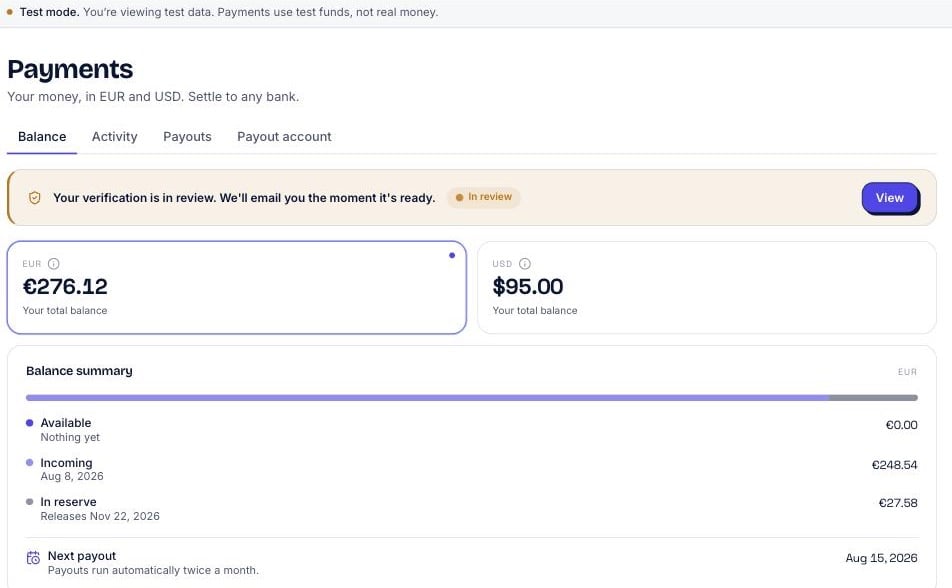 ## Your balance
Money doesn't move from "buyer paid" to "in your bank account" instantly. It passes through a few states first, mirroring how card networks and banking rails actually clear funds.
A payment has been confirmed, but it's still clearing. New card and bank sales clear over about 14 days before they're payable, the same way they would through any card acquirer.
Cleared and yours to pay out. This is what moves on your next payout.
A small reserve is held on newer accounts to cover refunds and chargebacks. It releases over time as your payment history builds.
The date your available balance is scheduled to move. Shown per currency on the **Payouts** page.
```mermaid theme={null}
flowchart LR
A[Buyer pays
## Your balance
Money doesn't move from "buyer paid" to "in your bank account" instantly. It passes through a few states first, mirroring how card networks and banking rails actually clear funds.
A payment has been confirmed, but it's still clearing. New card and bank sales clear over about 14 days before they're payable, the same way they would through any card acquirer.
Cleared and yours to pay out. This is what moves on your next payout.
A small reserve is held on newer accounts to cover refunds and chargebacks. It releases over time as your payment history builds.
The date your available balance is scheduled to move. Shown per currency on the **Payouts** page.
```mermaid theme={null}
flowchart LR
A[Buyer pays
card, bank, or stablecoin] --> B[Incoming
clearing ~14 days]
B --> C[Available]
C --> D[Payout
bank, EUR or USD]
B -.->|newer accounts| E[In reserve]
E -.->|releases over time| C
```
## Where payouts go
Your balance pays out by bank transfer, same-currency: EUR to a EUR account and USD to a USD account, with no cross-currency FX.
Paid through our banking partner to the countries listed in [Supported countries](/mor/supported-countries), in the currency your balance holds. Cross-border routes carry a Swift fee (see the fee table on that page).
## Schedule
Payouts **run automatically twice a month**. Your available balance moves to your bank account on the scheduled payout date, shown per currency on the **Payouts** page. There's nothing to trigger by hand.
## Fees
Payout fees are a **pass-through, at cost, with no markup**. AgentaOS doesn't add anything on top of what the banking or on-chain rail actually costs to move your money. For bank payouts, cross-border routes carry a Swift fee, see the fee table on [Supported countries](/mor/supported-countries) for the current routes and amounts.
## Getting paid out
Any completed checkout, card, bank, or stablecoin, adds to your balance. See [Checkouts](/payments/checkouts) and [Payment links](/payments/payment-links).
Funds move from **Incoming** to **Available** automatically, over about 14 days for new card and bank sales. No action needed on your end.
Add the bank account where you want to receive your payouts, in EUR or USD.
Your available balance moves to your bank account automatically, twice a month, on the schedule shown on the **Payouts** page.
## FAQ
Your balance settles in EUR or USD. Bank payouts are same-currency, EUR to a EUR account and USD to a USD account, with no cross-currency FX.
Automatically, twice a month. Your available balance moves on the scheduled payout date shown on the **Payouts** page.
Yes. Add the bank account you want to receive payouts to first.
Yes, refunded or disputed amounts are deducted from your balance rather than paid out. On newer accounts a small reserve is held to cover them.
## Legacy
An optional, advanced way to withdraw your balance on-chain to a wallet you control, from anywhere. You're moving your own balance to your own address.
## Next steps
Where bank payouts reach, and the payout fee table.
How a payment turns into money on your balance in the first place.
Create the payments that fund your balance.
Get notified the moment a checkout completes.