> ## Documentation Index
> Fetch the complete documentation index at: https://docs.agentaos.ai/llms.txt
> Use this file to discover all available pages before exploring further.
# Payment Links
> Create a reusable, shareable link to sell a product. One-time or subscription, no code required to share it.
A payment link is a reusable product. Create one and share the URL anywhere: email, a landing page, a chat message. Every visitor who opens it gets their own checkout. One link can be paid many times.
**Payment link vs. checkout:** a payment link is a template you create once and share. A [checkout](/payments/checkouts) is a single payment attempt, either created standalone or from a link. Opening a payment link's URL creates a new checkout behind the scenes.
## Without code
Do not want to touch the API? Create a product in the dashboard and share its link.
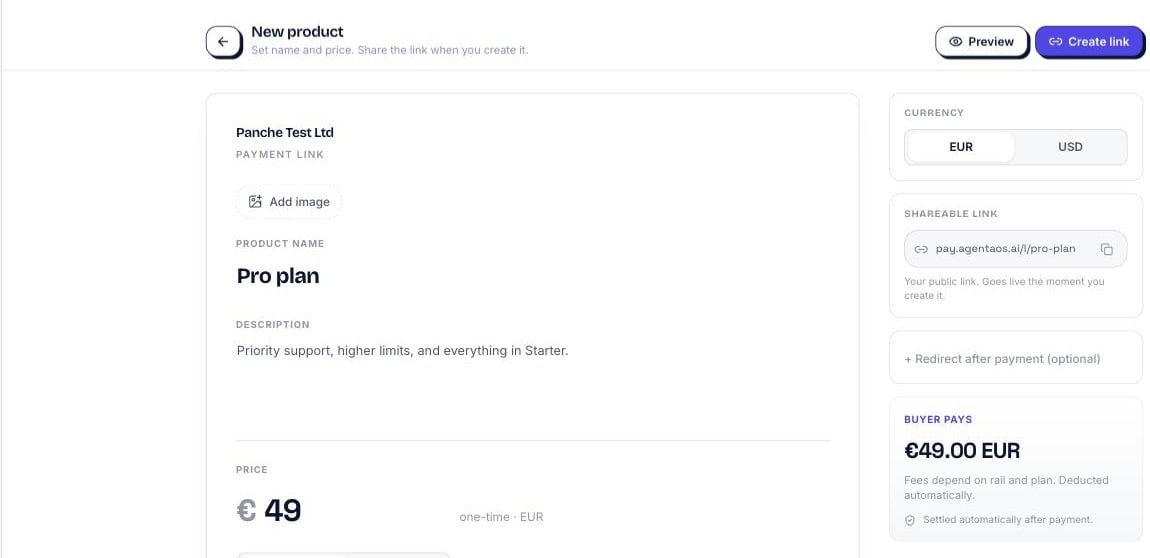 Open the **Products** page and add a name, description, price, and an optional image.
Click **Share** to copy the product's payment link. Send it by email, social, or a QR code. Every visit starts a fresh checkout.
Prefer code? Create links programmatically below.
## Create a payment link
```typescript theme={null}
import { AgentaOS } from '@agentaos/pay';
const agentaos = new AgentaOS(process.env.AGENTAOS_API_KEY!);
const link = await agentaos.paymentLinks.create({
amount: 49.99,
currency: 'EUR',
description: 'Pro plan',
successUrl: 'https://myshop.com/success',
cancelUrl: 'https://myshop.com/cancel',
webhookUrl: 'https://myshop.com/webhooks',
});
console.log(link.checkoutUrl);
// → https://app.agentaos.ai/pay/7rr6S9ml4BMp829wV5WeAA
```
```bash theme={null}
curl -X POST https://api.agentaos.ai/api/v1/gateway/payment-links \
-H "x-api-key: sk_live_..." \
-H "Content-Type: application/json" \
-d '{
"amount": 49.99,
"currency": "EUR",
"description": "Pro plan",
"successUrl": "https://myshop.com/success",
"cancelUrl": "https://myshop.com/cancel",
"webhookUrl": "https://myshop.com/webhooks"
}'
```
There's no CLI command to create a payment link yet. Create one from the SDK, the REST API, or the [dashboard](https://app.agentaos.ai). The CLI's `agenta pay checkout` creates a one-off [checkout](/payments/checkouts), not a reusable link.
`amount` is in currency units, not cents. `49.99` means €49.99. See the [money model](/payments/checkouts#money-model) if you're wiring this up against real numbers.
## One-time vs. subscription
A payment link is `type: 'one_time'` by default: every payment is independent, and the link can be reused indefinitely. Set `type: 'subscription'` to turn it into a recurring plan. Subscription links require a `billingInterval` and a verified account that accepts card and bank; they can't run in on-chain-only mode.
```typescript theme={null}
const plan = await agentaos.paymentLinks.create({
amount: 29.99,
currency: 'EUR',
description: 'Pro plan, monthly',
type: 'subscription',
billingInterval: 'month', // 'month' | 'year', required for subscriptions
});
```
Creating a subscription link does not create a subscription. A subscription is created only when a buyer pays it at the hosted checkout. See [Subscriptions](/payments/subscriptions) for how the buyer-pays-in flow works and how to manage the result.
## The checkout URL
Every payment link returns a `checkoutUrl` in the shape `https://app.agentaos.ai/pay/{id}`. Share it as-is: a button, an email, a QR code. Each visit starts a fresh checkout scoped to that link's amount, currency, and configuration.
## Custom checkout fields
Collect extra information from the buyer before they pay by passing `checkoutFields`. Each field renders on the hosted checkout page and is required or optional per field.
```typescript theme={null}
const link = await agentaos.paymentLinks.create({
amount: 15.00,
currency: 'EUR',
description: 'Event ticket',
checkoutFields: [
{ key: 'attendeeName', label: 'Attendee name', type: 'text', required: true },
{ key: 'company', label: 'Company', type: 'text', required: false },
{ key: 'ticketTier', label: 'Ticket tier', type: 'select', required: true, options: ['Standard', 'VIP'] },
],
});
```
## Retrieve a payment link
```typescript theme={null}
const link = await agentaos.paymentLinks.retrieve('link-uuid');
```
```bash theme={null}
curl https://api.agentaos.ai/api/v1/gateway/payment-links/link-uuid \
-H "x-api-key: sk_live_..."
```
## List payment links
Paginated: every list call returns `{ items, total, hasMore }`.
```typescript theme={null}
const page = await agentaos.paymentLinks.list({ limit: 20, offset: 0 });
console.log(page.total, page.hasMore);
```
```bash theme={null}
curl "https://api.agentaos.ai/api/v1/gateway/payment-links?limit=20&offset=0" \
-H "x-api-key: sk_live_..."
```
## Cancel a payment link
Cancelling stops new checkouts from being created against the link. It does not affect checkouts already in progress or subscriptions already running from it.
```typescript theme={null}
await agentaos.paymentLinks.cancel('link-uuid');
```
```bash theme={null}
curl -X DELETE https://api.agentaos.ai/api/v1/gateway/payment-links/link-uuid \
-H "x-api-key: sk_live_..."
```
## Parameters
Amount in currency units (e.g. `49.99` = €49.99).
`EUR` or `USD`.
Shown on the checkout page. Max 1000 characters.
`one_time` or `subscription`.
`month` or `year`. Required when `type` is `subscription`, omit otherwise.
Redirect the buyer here after payment. HTTPS only.
"Cancel" link on the checkout page. HTTPS only.
Server notification URL for payment events. HTTPS only.
UUID of a pre-created tax rate.
Custom fields to collect from the buyer at checkout. Each item has `key`, `label`, `type` (`text` | `email` | `tel` | `select`), `required`, and optionally `placeholder` or `options` (for `select`).
ISO 8601. The link stops accepting new checkouts after this time.
Custom key-value data, returned unchanged on every checkout created from this link. Max 8KB.
## Response
Link UUID.
Shareable payment URL.
Amount in currency units.
Settlement currency.
`active` or `cancelled`.
`mor` (card + bank) or `crypto` (on-chain). Derived, never set by you.
`one_time` or `subscription`.
`month` or `year` for subscription links; `null` for one-time.
Times this link has been paid.
Custom fields configured on this link.
ISO 8601.
ISO 8601.
## Next steps
A single payment attempt, standalone or created from a link.
How a `type: 'subscription'` link turns into a running subscription.
Get notified the moment someone pays your link.
Why we can handle card, bank, and tax as your seller of record.
Open the **Products** page and add a name, description, price, and an optional image.
Click **Share** to copy the product's payment link. Send it by email, social, or a QR code. Every visit starts a fresh checkout.
Prefer code? Create links programmatically below.
## Create a payment link
```typescript theme={null}
import { AgentaOS } from '@agentaos/pay';
const agentaos = new AgentaOS(process.env.AGENTAOS_API_KEY!);
const link = await agentaos.paymentLinks.create({
amount: 49.99,
currency: 'EUR',
description: 'Pro plan',
successUrl: 'https://myshop.com/success',
cancelUrl: 'https://myshop.com/cancel',
webhookUrl: 'https://myshop.com/webhooks',
});
console.log(link.checkoutUrl);
// → https://app.agentaos.ai/pay/7rr6S9ml4BMp829wV5WeAA
```
```bash theme={null}
curl -X POST https://api.agentaos.ai/api/v1/gateway/payment-links \
-H "x-api-key: sk_live_..." \
-H "Content-Type: application/json" \
-d '{
"amount": 49.99,
"currency": "EUR",
"description": "Pro plan",
"successUrl": "https://myshop.com/success",
"cancelUrl": "https://myshop.com/cancel",
"webhookUrl": "https://myshop.com/webhooks"
}'
```
There's no CLI command to create a payment link yet. Create one from the SDK, the REST API, or the [dashboard](https://app.agentaos.ai). The CLI's `agenta pay checkout` creates a one-off [checkout](/payments/checkouts), not a reusable link.
`amount` is in currency units, not cents. `49.99` means €49.99. See the [money model](/payments/checkouts#money-model) if you're wiring this up against real numbers.
## One-time vs. subscription
A payment link is `type: 'one_time'` by default: every payment is independent, and the link can be reused indefinitely. Set `type: 'subscription'` to turn it into a recurring plan. Subscription links require a `billingInterval` and a verified account that accepts card and bank; they can't run in on-chain-only mode.
```typescript theme={null}
const plan = await agentaos.paymentLinks.create({
amount: 29.99,
currency: 'EUR',
description: 'Pro plan, monthly',
type: 'subscription',
billingInterval: 'month', // 'month' | 'year', required for subscriptions
});
```
Creating a subscription link does not create a subscription. A subscription is created only when a buyer pays it at the hosted checkout. See [Subscriptions](/payments/subscriptions) for how the buyer-pays-in flow works and how to manage the result.
## The checkout URL
Every payment link returns a `checkoutUrl` in the shape `https://app.agentaos.ai/pay/{id}`. Share it as-is: a button, an email, a QR code. Each visit starts a fresh checkout scoped to that link's amount, currency, and configuration.
## Custom checkout fields
Collect extra information from the buyer before they pay by passing `checkoutFields`. Each field renders on the hosted checkout page and is required or optional per field.
```typescript theme={null}
const link = await agentaos.paymentLinks.create({
amount: 15.00,
currency: 'EUR',
description: 'Event ticket',
checkoutFields: [
{ key: 'attendeeName', label: 'Attendee name', type: 'text', required: true },
{ key: 'company', label: 'Company', type: 'text', required: false },
{ key: 'ticketTier', label: 'Ticket tier', type: 'select', required: true, options: ['Standard', 'VIP'] },
],
});
```
## Retrieve a payment link
```typescript theme={null}
const link = await agentaos.paymentLinks.retrieve('link-uuid');
```
```bash theme={null}
curl https://api.agentaos.ai/api/v1/gateway/payment-links/link-uuid \
-H "x-api-key: sk_live_..."
```
## List payment links
Paginated: every list call returns `{ items, total, hasMore }`.
```typescript theme={null}
const page = await agentaos.paymentLinks.list({ limit: 20, offset: 0 });
console.log(page.total, page.hasMore);
```
```bash theme={null}
curl "https://api.agentaos.ai/api/v1/gateway/payment-links?limit=20&offset=0" \
-H "x-api-key: sk_live_..."
```
## Cancel a payment link
Cancelling stops new checkouts from being created against the link. It does not affect checkouts already in progress or subscriptions already running from it.
```typescript theme={null}
await agentaos.paymentLinks.cancel('link-uuid');
```
```bash theme={null}
curl -X DELETE https://api.agentaos.ai/api/v1/gateway/payment-links/link-uuid \
-H "x-api-key: sk_live_..."
```
## Parameters
Amount in currency units (e.g. `49.99` = €49.99).
`EUR` or `USD`.
Shown on the checkout page. Max 1000 characters.
`one_time` or `subscription`.
`month` or `year`. Required when `type` is `subscription`, omit otherwise.
Redirect the buyer here after payment. HTTPS only.
"Cancel" link on the checkout page. HTTPS only.
Server notification URL for payment events. HTTPS only.
UUID of a pre-created tax rate.
Custom fields to collect from the buyer at checkout. Each item has `key`, `label`, `type` (`text` | `email` | `tel` | `select`), `required`, and optionally `placeholder` or `options` (for `select`).
ISO 8601. The link stops accepting new checkouts after this time.
Custom key-value data, returned unchanged on every checkout created from this link. Max 8KB.
## Response
Link UUID.
Shareable payment URL.
Amount in currency units.
Settlement currency.
`active` or `cancelled`.
`mor` (card + bank) or `crypto` (on-chain). Derived, never set by you.
`one_time` or `subscription`.
`month` or `year` for subscription links; `null` for one-time.
Times this link has been paid.
Custom fields configured on this link.
ISO 8601.
ISO 8601.
## Next steps
A single payment attempt, standalone or created from a link.
How a `type: 'subscription'` link turns into a running subscription.
Get notified the moment someone pays your link.
Why we can handle card, bank, and tax as your seller of record.