> ## Documentation Index
> Fetch the complete documentation index at: https://docs.agentaos.ai/llms.txt
> Use this file to discover all available pages before exploring further.
# Discount codes
> Codes a buyer types at checkout to pay less, or to tell you who sent them. Create them in the dashboard or the CLI.
A discount code lets a buyer pay less at checkout. You can also make a code that takes nothing off and only tells you who sent the buyer, for example a referral or a podcast code. A code works on any product, one-time or subscription.
## Create a code
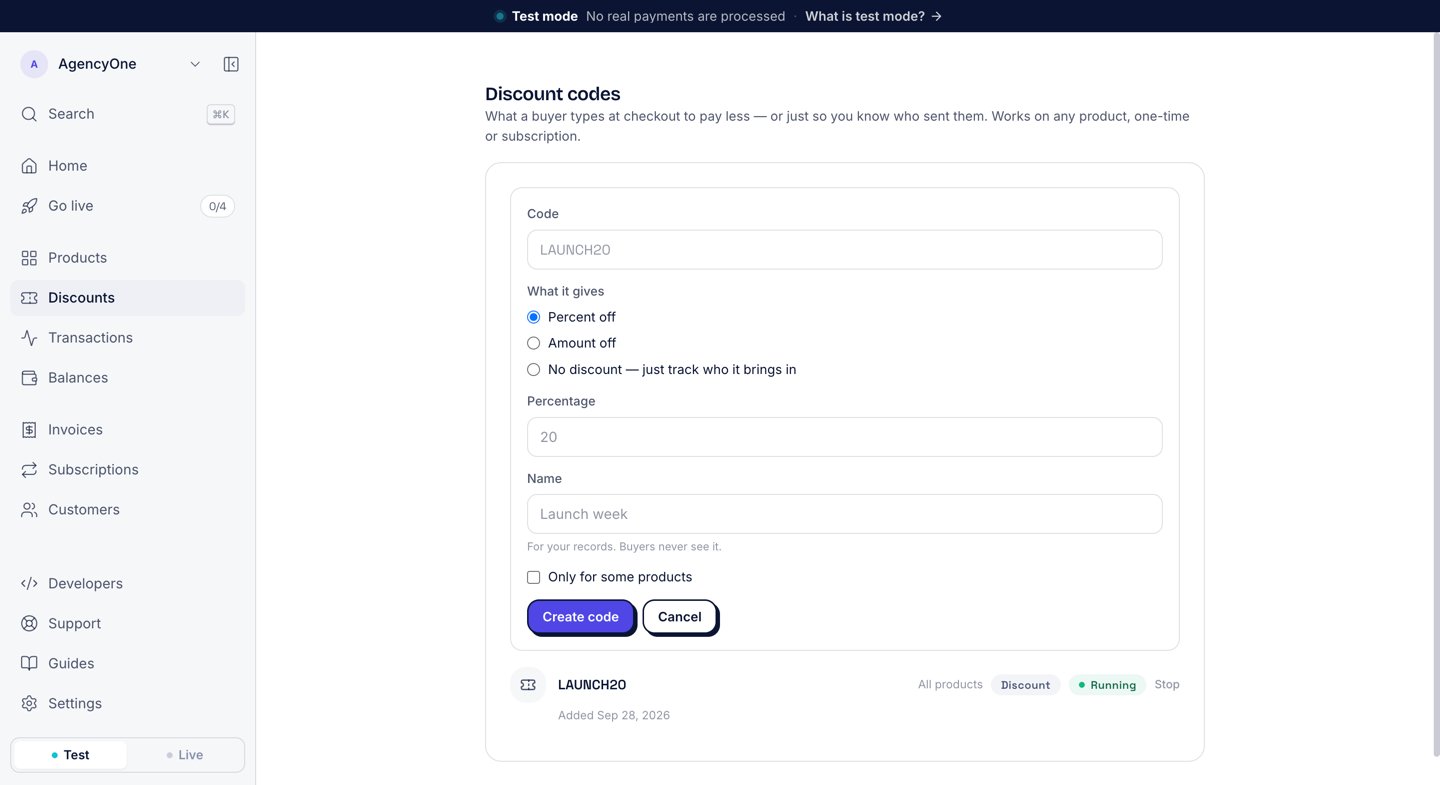
In the dashboard sidebar, click **Discounts**. The page lists your codes, and **New code** starts a new one.
* **Code**: the text the buyer types, for example `LAUNCH20`. Use letters, numbers, dashes, and underscores, up to 64 characters. Buyers can type it in upper or lower case.
* **What it gives**: pick **Percent off**, **Amount off**, or **No discount — just track who it brings in**. A percentage is between 1 and 99. For a full first period at no charge, use a free trial instead.
* **Name**: optional. "For your records. Buyers never see it."
* **Only for some products**: tick it to pick the products the code works on. Leave it clear and the code works on every product you sell.
The code works at checkout right away.
 An **Amount off** code takes a fixed amount off the total the buyer pays, VAT included. If you limit an amount-off code to some products, those products must all use the same currency. To discount products in different currencies with one code, use a percentage.
## Your codes
Each code has one row: the code, the products it works on, its kind (**Discount** or **Tracking**), and its state (**Running** or **Stopped**). Click a code to see what it takes off and how many times buyers used it.
An **Amount off** code takes a fixed amount off the total the buyer pays, VAT included. If you limit an amount-off code to some products, those products must all use the same currency. To discount products in different currencies with one code, use a percentage.
## Your codes
Each code has one row: the code, the products it works on, its kind (**Discount** or **Tracking**), and its state (**Running** or **Stopped**). Click a code to see what it takes off and how many times buyers used it.
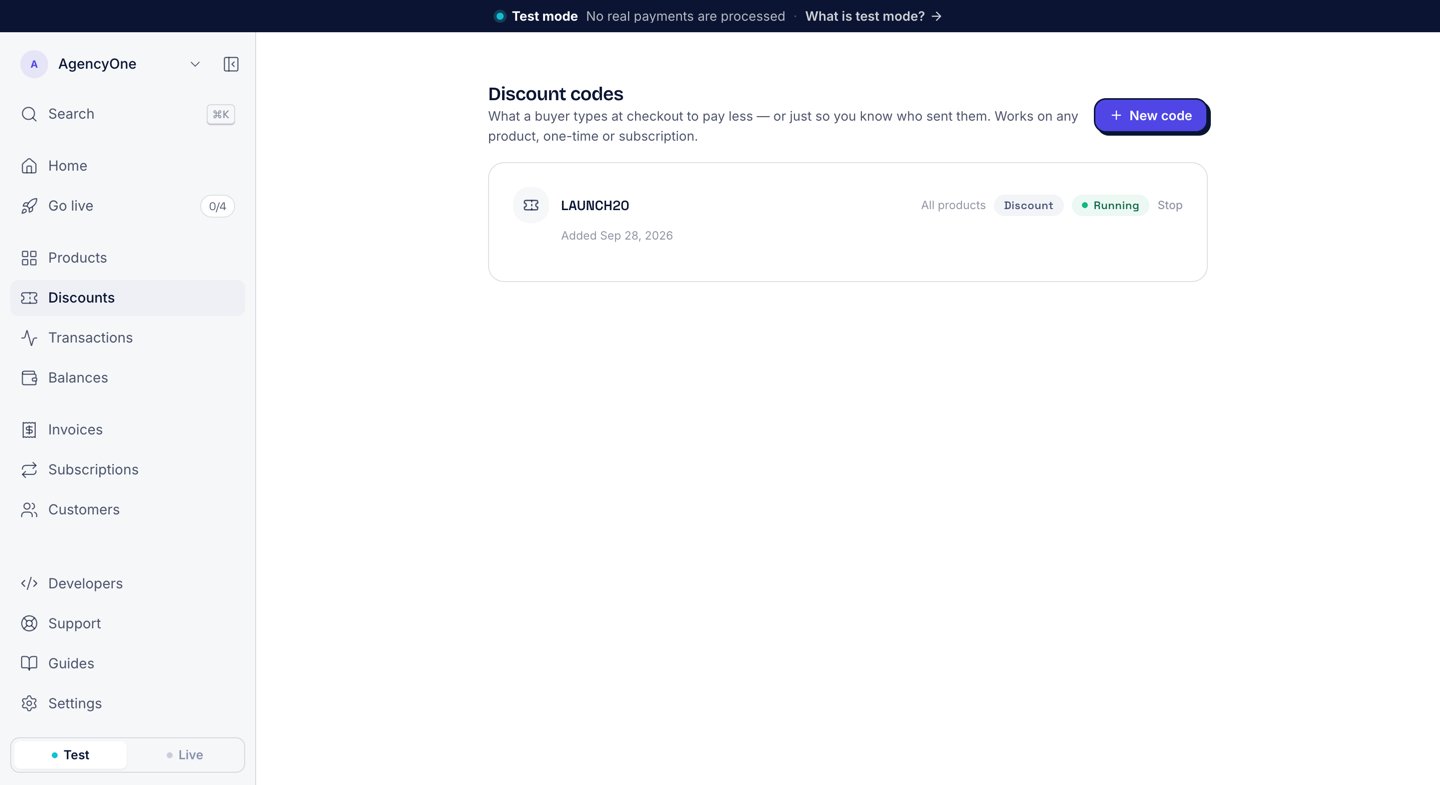 Click **Stop** to end a code. A stopped code no longer works at checkout. Subscribers who already used it keep the discount they got. You cannot change a code after you create it: stop it and create a new one.
Only an owner or admin of your business can create or stop a code.
## At checkout
On the hosted checkout, the buyer sees an optional **Discount code** field under **Your details**. After **Continue to payment**, the order summary shows the discount as its own line, and the pay step confirms the code, for example "LAUNCH20 · €2.00 off".
Click **Stop** to end a code. A stopped code no longer works at checkout. Subscribers who already used it keep the discount they got. You cannot change a code after you create it: stop it and create a new one.
Only an owner or admin of your business can create or stop a code.
## At checkout
On the hosted checkout, the buyer sees an optional **Discount code** field under **Your details**. After **Continue to payment**, the order summary shows the discount as its own line, and the pay step confirms the code, for example "LAUNCH20 · €2.00 off".
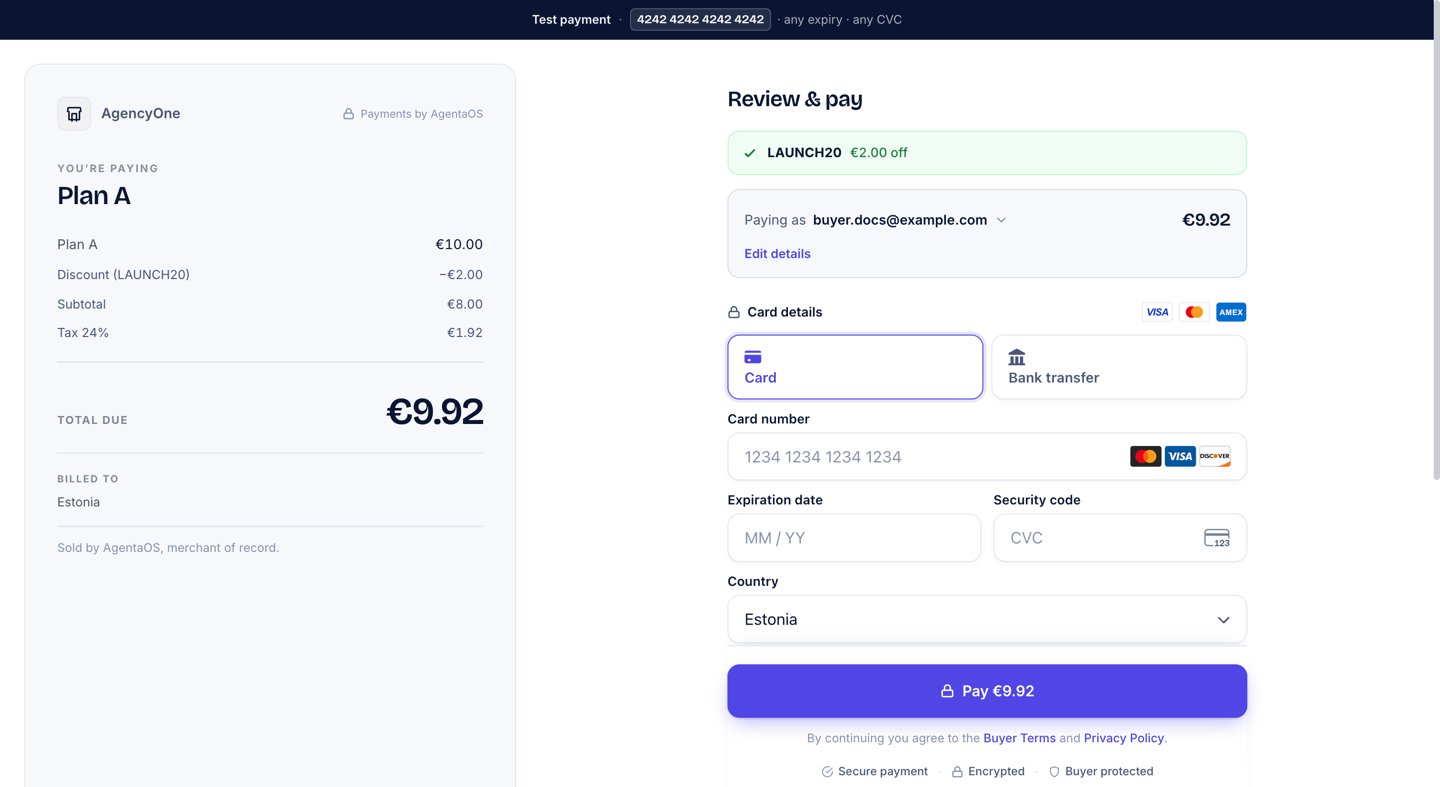 A percentage comes off the price before tax, and AgentaOS calculates the tax on the lower amount. In the example above, 24% tax on €8.00 is €1.92.
On a subscription, the discount applies to the first payment only. Every renewal charges the full price.
Discount codes work the same way on the [embedded checkout](/payments/embedded-checkout).
## From code
Create and stop codes from the CLI, signed in as an owner or admin. The CLI also sets two limits the dashboard form does not have: a maximum number of uses and an end date. With an API key, the SDK can read your codes and list who used one, but it cannot create or stop codes.
```bash theme={"system"}
# 20% off the first payment
agenta discounts create --code LAUNCH20 --percent-off 20
# 5.00 off in your currency, stops after 100 uses or on Dec 31, 2026
agenta discounts create --code SAVE5 --amount-off 5.00 \
--max-redemptions 100 --expires-at 2026-12-31
# No discount: only track who the code brings in
agenta discounts create --code PODCAST
agenta discounts list
agenta discounts show # what it takes off, times used
agenta discounts archive # stop the code
# Subscribers who used a code
agenta subscriptions list --code LAUNCH20
```
```typescript theme={"system"}
const page = await agentaos.discountCodes.list({ limit: 20 });
const code = await agentaos.discountCodes.get('code-uuid');
console.log(code.code, code.termsLabel, code.timesRedeemed, code.active);
// LAUNCH20 20% off 14 true
// Subscribers who used a code (matched in upper or lower case)
const subscribers = await agentaos.subscriptions.list({ discountCode: 'LAUNCH20' });
```
## Next steps
See who subscribed and manage running subscriptions.
Start a checkout from your own code.
A percentage comes off the price before tax, and AgentaOS calculates the tax on the lower amount. In the example above, 24% tax on €8.00 is €1.92.
On a subscription, the discount applies to the first payment only. Every renewal charges the full price.
Discount codes work the same way on the [embedded checkout](/payments/embedded-checkout).
## From code
Create and stop codes from the CLI, signed in as an owner or admin. The CLI also sets two limits the dashboard form does not have: a maximum number of uses and an end date. With an API key, the SDK can read your codes and list who used one, but it cannot create or stop codes.
```bash theme={"system"}
# 20% off the first payment
agenta discounts create --code LAUNCH20 --percent-off 20
# 5.00 off in your currency, stops after 100 uses or on Dec 31, 2026
agenta discounts create --code SAVE5 --amount-off 5.00 \
--max-redemptions 100 --expires-at 2026-12-31
# No discount: only track who the code brings in
agenta discounts create --code PODCAST
agenta discounts list
agenta discounts show # what it takes off, times used
agenta discounts archive # stop the code
# Subscribers who used a code
agenta subscriptions list --code LAUNCH20
```
```typescript theme={"system"}
const page = await agentaos.discountCodes.list({ limit: 20 });
const code = await agentaos.discountCodes.get('code-uuid');
console.log(code.code, code.termsLabel, code.timesRedeemed, code.active);
// LAUNCH20 20% off 14 true
// Subscribers who used a code (matched in upper or lower case)
const subscribers = await agentaos.subscriptions.list({ discountCode: 'LAUNCH20' });
```
## Next steps
See who subscribed and manage running subscriptions.
Start a checkout from your own code.