> ## Documentation Index
> Fetch the complete documentation index at: https://docs.agentaos.ai/llms.txt
> Use this file to discover all available pages before exploring further.
# Checkouts
> Create a checkout session to collect a single payment. Standalone, or from a payment link.
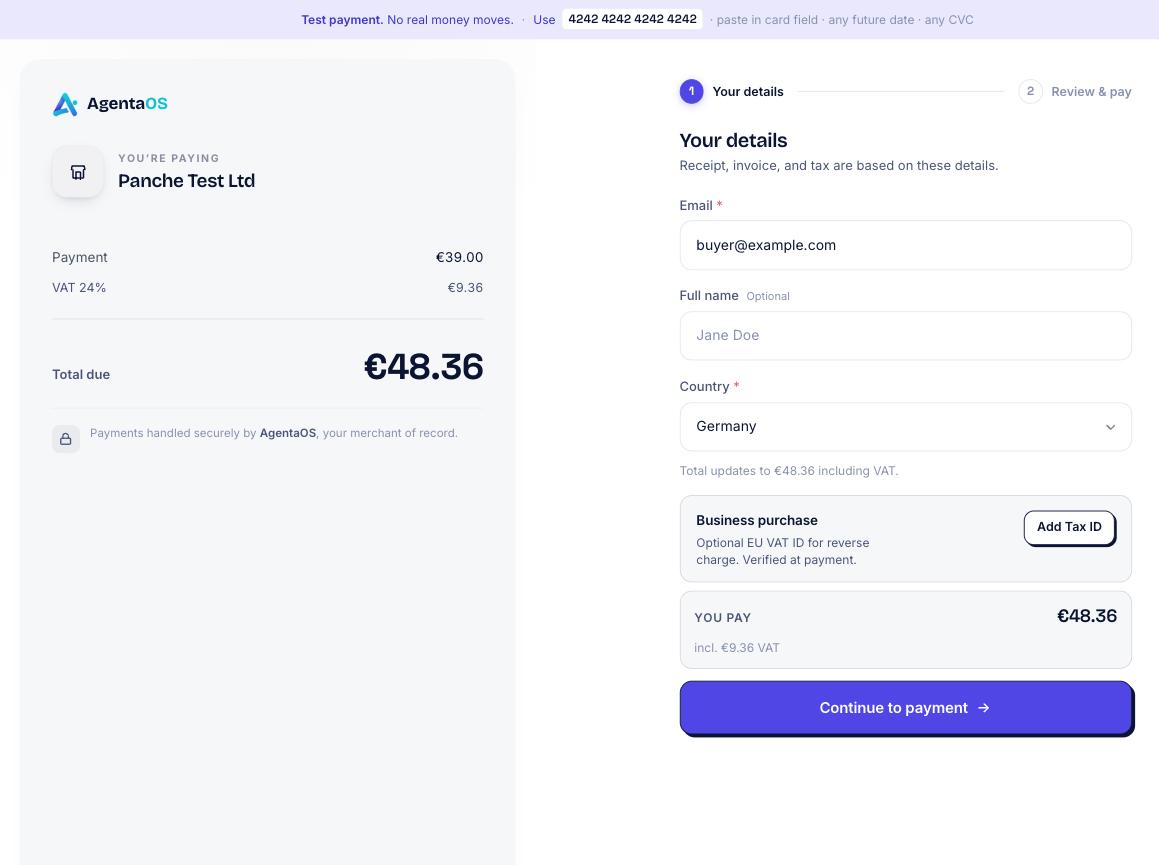
A checkout is one attempt to collect one payment. Create one directly from your backend when you already know the amount, or create one from a [payment link](/payments/payment-links) to reuse a shared template. Either way you get a `checkoutUrl`: send your buyer there to pay.
 ```mermaid theme={null}
stateDiagram-v2
[*] --> open: checkouts.create()
open --> completed: Payment confirmed
open --> expired: expiresIn elapsed
open --> cancelled: checkouts.cancel()
completed --> [*]
expired --> [*]
cancelled --> [*]
```
## Create a checkout
```typescript theme={null}
import { AgentaOS } from '@agentaos/pay';
const agentaos = new AgentaOS(process.env.AGENTAOS_API_KEY!);
const checkout = await agentaos.checkouts.create({
amount: 49.99,
currency: 'EUR',
description: 'Order #123',
successUrl: 'https://myshop.com/success',
cancelUrl: 'https://myshop.com/cart',
webhookUrl: 'https://myshop.com/webhooks',
});
// Redirect your buyer to pay
res.redirect(checkout.checkoutUrl);
```
```bash theme={null}
agenta pay checkout --amount 49.99 --currency EUR --description "Order #123"
```
```bash theme={null}
curl -X POST https://api.agentaos.ai/api/v1/gateway/sessions \
-H "x-api-key: sk_live_..." \
-H "Content-Type: application/json" \
-d '{
"amount": 49.99,
"currency": "EUR",
"description": "Order #123",
"successUrl": "https://myshop.com/success",
"cancelUrl": "https://myshop.com/cart",
"webhookUrl": "https://myshop.com/webhooks"
}'
```
## Money model
A plain `amount` is always in currency units: `49.99` means €49.99, never cents. This holds for every create call, payment link, checkout, and invoice amount in the API. The one exception is `subscription.unitAmountMinor`, which is an integer of the smallest unit (`1999` = €19.99). See [Subscriptions](/payments/subscriptions) for why that field is different. Webhook payloads carry `amount` as a string (`"49.99"`), since JSON numbers lose trailing zeros.
## Create from a payment link
Pass `linkId` to inherit the link's `amount`, `currency`, `description`, `taxRateId`, and URLs. Override anything per-checkout with `amountOverride` or the other fields.
```typescript theme={null}
const checkout = await agentaos.checkouts.create({
linkId: link.id,
metadata: { customerId: '12345' },
});
```
**Payment links vs. standalone checkouts:** use a payment link for anything reusable or shareable, a subscription plan, a donation button, a link you paste in chat. Use a standalone checkout when your backend already knows the amount and buyer at the moment of creation, like an e-commerce order at cart checkout.
A standalone (linkless) checkout is always a **one-time** payment, there's no `type` field on checkout create. To sell a subscription, create a subscription payment link (`type: 'subscription'`) and the buyer subscribes at the hosted checkout, or spin up a checkout from that link with `linkId`.
## Pre-populate buyer info
If you already know the buyer (from your own account system), pre-fill their details to skip the checkout form:
```typescript theme={null}
const checkout = await agentaos.checkouts.create({
amount: 49.99,
currency: 'EUR',
buyerEmail: 'john@example.com',
buyerName: 'John Doe',
buyerCompany: 'Acme Corp',
buyerCountry: 'DE',
buyerVat: 'DE123456789',
buyerAddress: '123 Main St, Berlin',
});
```
If you don't pre-populate, the hosted checkout asks the buyer for name and email directly. Company, VAT, and address are optional but recommended: they land on the invoice.
## How the buyer pays
The hosted checkout offers card, Apple Pay, and Google Pay through our card processor. Card details are entered directly into the secure card form, never handled by your server or ours.
Don't trust `successUrl` as proof of payment. The buyer's browser might close before the redirect fires. Use [webhooks](/payments/webhooks) as the source of truth for "did this checkout actually get paid."
## Retrieve a checkout
```typescript theme={null}
const checkout = await agentaos.checkouts.retrieve('mZrESFyR7RC9RPsJfZCVkg');
console.log(checkout.status); // 'open' | 'completed' | 'expired' | 'cancelled'
```
```bash theme={null}
agenta pay get mZrESFyR7RC9RPsJfZCVkg
```
```bash theme={null}
curl https://api.agentaos.ai/api/v1/gateway/sessions/mZrESFyR7RC9RPsJfZCVkg \
-H "x-api-key: sk_live_..."
```
## List checkouts
Paginated: every list call returns `{ items, total, hasMore }`.
```typescript theme={null}
const page = await agentaos.checkouts.list({
status: 'completed',
limit: 10,
offset: 0,
});
```
```bash theme={null}
agenta pay list --status completed --limit 10
```
```bash theme={null}
curl "https://api.agentaos.ai/api/v1/gateway/sessions?status=completed&limit=10" \
-H "x-api-key: sk_live_..."
```
## Cancel a checkout
```typescript theme={null}
await agentaos.checkouts.cancel('mZrESFyR7RC9RPsJfZCVkg');
```
```bash theme={null}
curl -X POST https://api.agentaos.ai/api/v1/gateway/sessions/mZrESFyR7RC9RPsJfZCVkg/cancel \
-H "x-api-key: sk_live_..."
```
Cancelling stops the buyer from paying. If a payment already cleared before the cancel call lands, it still completes; cancelling doesn't reach into the card processor or on-chain state.
## Parameters
Amount in currency units (e.g. `49.99`). Required if no `linkId`.
Create from a payment link template. Inherits its amount, currency, and configuration.
`EUR` or `USD`.
Shown on the checkout page. Max 1000 characters.
Override the link's amount for this checkout only.
Redirect the buyer here after payment. HTTPS only.
"Cancel" link on the checkout page. HTTPS only.
Server notification URL for payment events. HTTPS only.
UUID of a pre-created tax rate.
Pre-populate buyer email. Max 320 characters.
Pre-populate buyer name. Max 200 characters.
Pre-populate company name. Max 200 characters.
ISO 3166-1 alpha-2 (e.g. `DE`).
Pre-populate buyer address. Max 500 characters.
Pre-populate VAT number (e.g. `DE123456789`).
ISO date (`YYYY-MM-DD`). Presentation only, stamped onto the invoice once issued.
Seconds until expiry (300 to 86400).
Custom key-value data, returned unchanged in webhooks. Max 8KB.
## Response
These are the SDK (camelCase) field names; the raw REST response uses snake\_case (e.g. `session_id`, `seller_mode`).
Session UUID.
Public session ID, used in the checkout URL.
URL to send your buyer to.
`open`, `completed`, `expired`, or `cancelled`.
`mor` (card + bank) or `crypto` (on-chain). Inherited from the link, or derived from your account for standalone checkouts.
Amount for this checkout, if overridden.
Settlement currency.
Issued invoice UUID. `null` until the payment is confirmed.
Human-readable invoice number, once issued.
ISO 8601.
ISO 8601.
## Next steps
Turn a checkout into a reusable, shareable template.
Paying a subscription-type link at checkout starts a subscription.
Every completed checkout issues a VAT-correct invoice.
Verify `checkout.session.completed` server-side, don't rely on the redirect.
```mermaid theme={null}
stateDiagram-v2
[*] --> open: checkouts.create()
open --> completed: Payment confirmed
open --> expired: expiresIn elapsed
open --> cancelled: checkouts.cancel()
completed --> [*]
expired --> [*]
cancelled --> [*]
```
## Create a checkout
```typescript theme={null}
import { AgentaOS } from '@agentaos/pay';
const agentaos = new AgentaOS(process.env.AGENTAOS_API_KEY!);
const checkout = await agentaos.checkouts.create({
amount: 49.99,
currency: 'EUR',
description: 'Order #123',
successUrl: 'https://myshop.com/success',
cancelUrl: 'https://myshop.com/cart',
webhookUrl: 'https://myshop.com/webhooks',
});
// Redirect your buyer to pay
res.redirect(checkout.checkoutUrl);
```
```bash theme={null}
agenta pay checkout --amount 49.99 --currency EUR --description "Order #123"
```
```bash theme={null}
curl -X POST https://api.agentaos.ai/api/v1/gateway/sessions \
-H "x-api-key: sk_live_..." \
-H "Content-Type: application/json" \
-d '{
"amount": 49.99,
"currency": "EUR",
"description": "Order #123",
"successUrl": "https://myshop.com/success",
"cancelUrl": "https://myshop.com/cart",
"webhookUrl": "https://myshop.com/webhooks"
}'
```
## Money model
A plain `amount` is always in currency units: `49.99` means €49.99, never cents. This holds for every create call, payment link, checkout, and invoice amount in the API. The one exception is `subscription.unitAmountMinor`, which is an integer of the smallest unit (`1999` = €19.99). See [Subscriptions](/payments/subscriptions) for why that field is different. Webhook payloads carry `amount` as a string (`"49.99"`), since JSON numbers lose trailing zeros.
## Create from a payment link
Pass `linkId` to inherit the link's `amount`, `currency`, `description`, `taxRateId`, and URLs. Override anything per-checkout with `amountOverride` or the other fields.
```typescript theme={null}
const checkout = await agentaos.checkouts.create({
linkId: link.id,
metadata: { customerId: '12345' },
});
```
**Payment links vs. standalone checkouts:** use a payment link for anything reusable or shareable, a subscription plan, a donation button, a link you paste in chat. Use a standalone checkout when your backend already knows the amount and buyer at the moment of creation, like an e-commerce order at cart checkout.
A standalone (linkless) checkout is always a **one-time** payment, there's no `type` field on checkout create. To sell a subscription, create a subscription payment link (`type: 'subscription'`) and the buyer subscribes at the hosted checkout, or spin up a checkout from that link with `linkId`.
## Pre-populate buyer info
If you already know the buyer (from your own account system), pre-fill their details to skip the checkout form:
```typescript theme={null}
const checkout = await agentaos.checkouts.create({
amount: 49.99,
currency: 'EUR',
buyerEmail: 'john@example.com',
buyerName: 'John Doe',
buyerCompany: 'Acme Corp',
buyerCountry: 'DE',
buyerVat: 'DE123456789',
buyerAddress: '123 Main St, Berlin',
});
```
If you don't pre-populate, the hosted checkout asks the buyer for name and email directly. Company, VAT, and address are optional but recommended: they land on the invoice.
## How the buyer pays
The hosted checkout offers card, Apple Pay, and Google Pay through our card processor. Card details are entered directly into the secure card form, never handled by your server or ours.
Don't trust `successUrl` as proof of payment. The buyer's browser might close before the redirect fires. Use [webhooks](/payments/webhooks) as the source of truth for "did this checkout actually get paid."
## Retrieve a checkout
```typescript theme={null}
const checkout = await agentaos.checkouts.retrieve('mZrESFyR7RC9RPsJfZCVkg');
console.log(checkout.status); // 'open' | 'completed' | 'expired' | 'cancelled'
```
```bash theme={null}
agenta pay get mZrESFyR7RC9RPsJfZCVkg
```
```bash theme={null}
curl https://api.agentaos.ai/api/v1/gateway/sessions/mZrESFyR7RC9RPsJfZCVkg \
-H "x-api-key: sk_live_..."
```
## List checkouts
Paginated: every list call returns `{ items, total, hasMore }`.
```typescript theme={null}
const page = await agentaos.checkouts.list({
status: 'completed',
limit: 10,
offset: 0,
});
```
```bash theme={null}
agenta pay list --status completed --limit 10
```
```bash theme={null}
curl "https://api.agentaos.ai/api/v1/gateway/sessions?status=completed&limit=10" \
-H "x-api-key: sk_live_..."
```
## Cancel a checkout
```typescript theme={null}
await agentaos.checkouts.cancel('mZrESFyR7RC9RPsJfZCVkg');
```
```bash theme={null}
curl -X POST https://api.agentaos.ai/api/v1/gateway/sessions/mZrESFyR7RC9RPsJfZCVkg/cancel \
-H "x-api-key: sk_live_..."
```
Cancelling stops the buyer from paying. If a payment already cleared before the cancel call lands, it still completes; cancelling doesn't reach into the card processor or on-chain state.
## Parameters
Amount in currency units (e.g. `49.99`). Required if no `linkId`.
Create from a payment link template. Inherits its amount, currency, and configuration.
`EUR` or `USD`.
Shown on the checkout page. Max 1000 characters.
Override the link's amount for this checkout only.
Redirect the buyer here after payment. HTTPS only.
"Cancel" link on the checkout page. HTTPS only.
Server notification URL for payment events. HTTPS only.
UUID of a pre-created tax rate.
Pre-populate buyer email. Max 320 characters.
Pre-populate buyer name. Max 200 characters.
Pre-populate company name. Max 200 characters.
ISO 3166-1 alpha-2 (e.g. `DE`).
Pre-populate buyer address. Max 500 characters.
Pre-populate VAT number (e.g. `DE123456789`).
ISO date (`YYYY-MM-DD`). Presentation only, stamped onto the invoice once issued.
Seconds until expiry (300 to 86400).
Custom key-value data, returned unchanged in webhooks. Max 8KB.
## Response
These are the SDK (camelCase) field names; the raw REST response uses snake\_case (e.g. `session_id`, `seller_mode`).
Session UUID.
Public session ID, used in the checkout URL.
URL to send your buyer to.
`open`, `completed`, `expired`, or `cancelled`.
`mor` (card + bank) or `crypto` (on-chain). Inherited from the link, or derived from your account for standalone checkouts.
Amount for this checkout, if overridden.
Settlement currency.
Issued invoice UUID. `null` until the payment is confirmed.
Human-readable invoice number, once issued.
ISO 8601.
ISO 8601.
## Next steps
Turn a checkout into a reusable, shareable template.
Paying a subscription-type link at checkout starts a subscription.
Every completed checkout issues a VAT-correct invoice.
Verify `checkout.session.completed` server-side, don't rely on the redirect.