> ## Documentation Index
> Fetch the complete documentation index at: https://docs.agentaos.ai/llms.txt
> Use this file to discover all available pages before exploring further.
# Verify your business
> The two checks before real money moves: the business review unlocks live sales, and the identity check unlocks payouts.
Verification has two parts. The **business review** (KYB, short for know your business) checks your business and what it sells, and it must be approved before you take live card and bank payments. The **identity check** (KYC, short for know your customer) confirms the person we pay with a photo of an ID document, and it must pass before your first payout. Test mode needs neither, so you can build and test everything first.
| Check | What it unlocks | Where you start it | Who does it |
| - | - | - | - |
| Business review | Live card and bank payments | **Go live** in the sidebar, the **Verify your business** row | An owner or admin of the account |
| Identity check | Payouts | **Home** or **Balances**, in live mode | An owner or admin of the account |
The identity check runs once. When it passes, it covers every later payout.
## The business review
The business review asks who you are, where your business is registered, and what you sell. A person reads your answers and your website. See [Account review](/mor/account-review) for the checklist we review against and the details to have ready.
### Submit the review
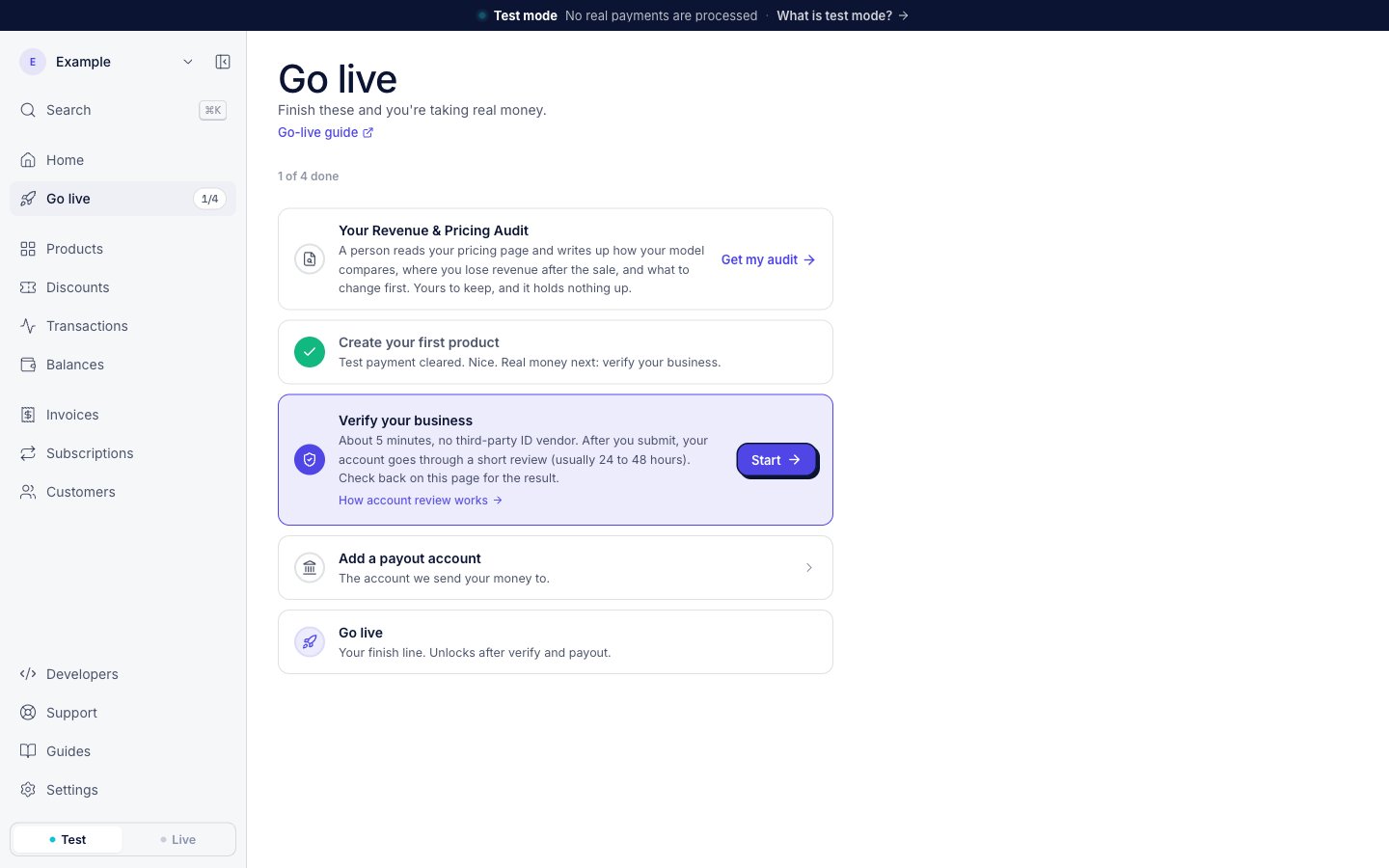
In the dashboard sidebar, click **Go live**.
On the **Verify your business** row, click **Start**. The row says it takes "About 5 minutes".
The form asks one question at a time. When you submit, the dashboard shows **Submitted for review**.
 ### After you submit
A person reviews your business, usually within 24 to 48 hours. You cannot edit the application while it is in review. The **Verify your business** row on **Go live** shows where the review is:
| Status | What the row shows | What you do |
| - | - | - |
| In review | An **In review** label and "You're done here." | Nothing. We email you when the review is done. |
| Changes requested | "We need a few details changed before we can approve you." and a **See changes** button | Click **See changes**, make each change, then click **Send back for review**. |
| Rejected | The reason, and a **Resubmit** button | Fix the reason, then click **Resubmit**. If the row shows a date, the **Resubmit** button comes back after that date. |
| On hold | An **On hold** label and the reason | Reply to our email. |
| Verified | "Verified. Card and bank payments are on." | Nothing. |
Each decision also comes by email. The subject line tells you which one it is:
| Subject | What happened |
| - | - |
| One thing missing, or the number of things missing | We need changes before we can approve you. The email lists them. |
| You’re approved. Go get paid. | The review is approved. You can take live payments. |
| We said no. Here’s why. | The review is rejected. The email gives the reason, and the date after which you can apply again when there is one. |
| We’ve paused your account. Your balance is fine. | Your account is on hold. New payments, subscription charges and payouts stop. Your balance stays yours. |
| You’re back on | The hold is lifted, and payments and payouts start again. |
## The identity check
The identity check confirms who we pay. It exists only in live mode, because only a live payout sends real money. An owner or admin of the account completes it. A team member with a lower role cannot start it.
### Documents for the check
* **An ID document**: you take a photo of it.
* **A selfie**: you take it during the check. You can finish the check on your phone.
The dashboard says the check is "checked automatically, usually in under a minute, and you only do this once." For a business registered as a company, the check verifies the company register and its key people.
### Start the check
Before you have money to pay out, the **Payout accounts** tab on **Balances** shows a note about the check. The note has no button.
### After you submit
A person reviews your business, usually within 24 to 48 hours. You cannot edit the application while it is in review. The **Verify your business** row on **Go live** shows where the review is:
| Status | What the row shows | What you do |
| - | - | - |
| In review | An **In review** label and "You're done here." | Nothing. We email you when the review is done. |
| Changes requested | "We need a few details changed before we can approve you." and a **See changes** button | Click **See changes**, make each change, then click **Send back for review**. |
| Rejected | The reason, and a **Resubmit** button | Fix the reason, then click **Resubmit**. If the row shows a date, the **Resubmit** button comes back after that date. |
| On hold | An **On hold** label and the reason | Reply to our email. |
| Verified | "Verified. Card and bank payments are on." | Nothing. |
Each decision also comes by email. The subject line tells you which one it is:
| Subject | What happened |
| - | - |
| One thing missing, or the number of things missing | We need changes before we can approve you. The email lists them. |
| You’re approved. Go get paid. | The review is approved. You can take live payments. |
| We said no. Here’s why. | The review is rejected. The email gives the reason, and the date after which you can apply again when there is one. |
| We’ve paused your account. Your balance is fine. | Your account is on hold. New payments, subscription charges and payouts stop. Your balance stays yours. |
| You’re back on | The hold is lifted, and payments and payouts start again. |
## The identity check
The identity check confirms who we pay. It exists only in live mode, because only a live payout sends real money. An owner or admin of the account completes it. A team member with a lower role cannot start it.
### Documents for the check
* **An ID document**: you take a photo of it.
* **A selfie**: you take it during the check. You can finish the check on your phone.
The dashboard says the check is "checked automatically, usually in under a minute, and you only do this once." For a business registered as a company, the check verifies the company register and its key people.
### Start the check
Before you have money to pay out, the **Payout accounts** tab on **Balances** shows a note about the check. The note has no button.
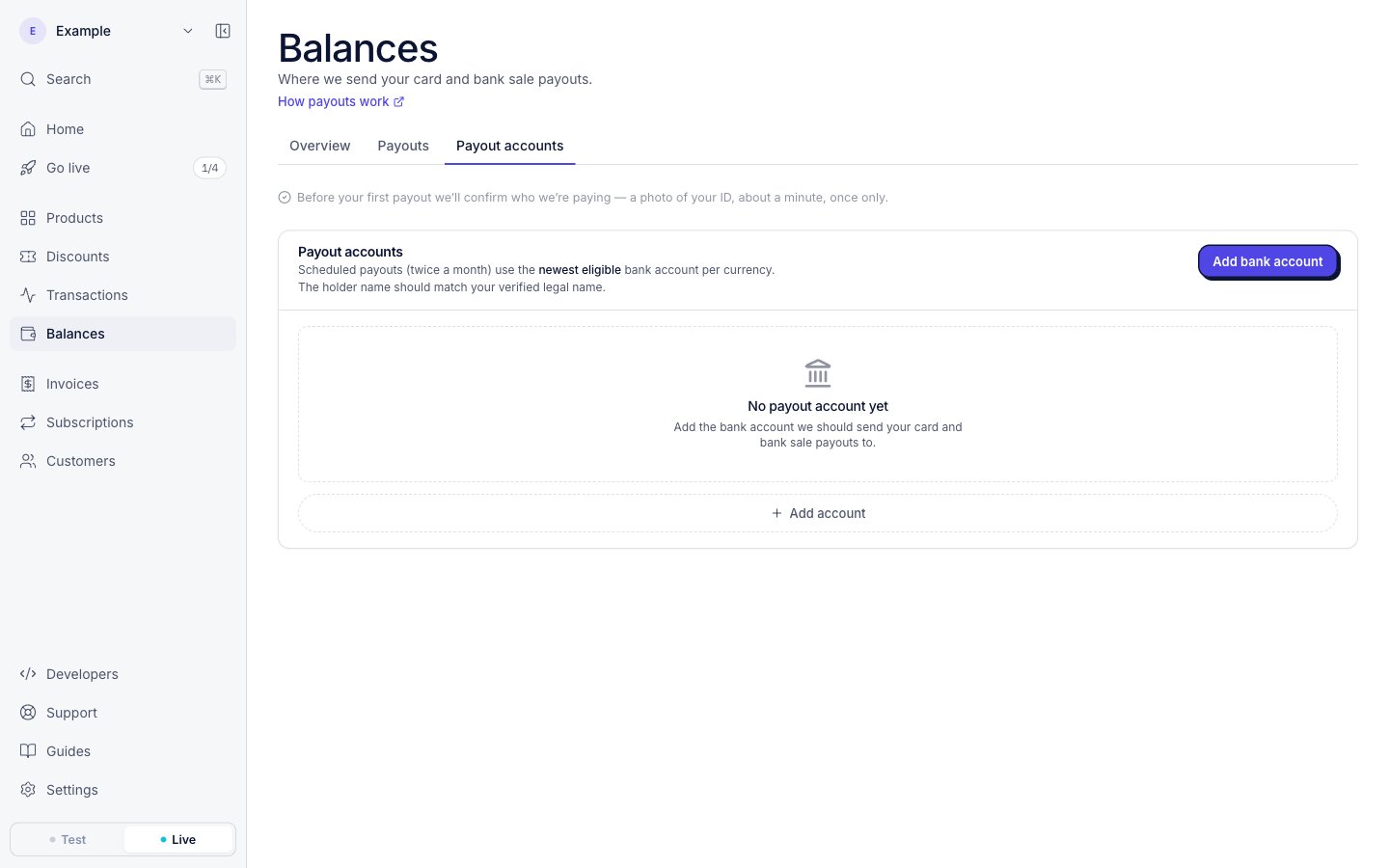 When you have money to pay out, a message about the check shows on **Home** and at the top of every **Balances** tab. Click **Verify and get paid** to open the check. When you finish, the check returns you to the **Payouts** tab on **Balances**.
### Check status messages
The same message on **Home** and **Balances** tells you where your check is:
| Where the check is | The message | The button |
| - | - | - |
| Not started, with money to pay out | Names your balance and what the check takes | **Verify and get paid** |
| Started, not finished | **Picking up where you left off** | **Continue** opens the same check again |
| Submitted | **Checking your documents now**, "This usually takes a few minutes" | None |
| Did not go through | Says your money is safe and still yours | **Try again** |
| Passed | Says "We’ll pay" and the name we pay | None |
If you request a payout before the check passes, we keep the request. The payout goes out in the first payout run after the check passes, and you do not need to request it again. See [Payouts](/payouts/overview) for the payout schedule.
The confirmation names who we pay. Read that name. If it is wrong, contact support before your first payout. For a company, the ID names its owner and we pay the company. That difference is expected.
### Identity check emails
| Subject | When we send it |
| - | - |
| The amount, then "is waiting on one boring step" | You have money to pay out and the check has not passed. We send it a few days before each payout run, at most twice a month. |
| Your money is safe, we just need to try that check again | The check did not go through. |
### If the check does not go through
The usual cause is a blurry photo or a document the check cannot read. Click **Try again** to do the check again. If it still does not go through, reply to the email and a person works it out with you.
### If you cannot use the identity check
Some people cannot use the check: for example, a person with no phone that has a camera, or with a document the check does not read. Contact support. A person then confirms your identity another way. A person's confirmation counts the same as the automatic check.
## Payout accounts and your name
The holder name on your payout account should match your verified legal name. When you save a payout account, a separate name check compares the name with your bank's records. See [Add a payout account](/payouts/payout-accounts) for its labels and what to do about each one.
## Businesses managed by a platform
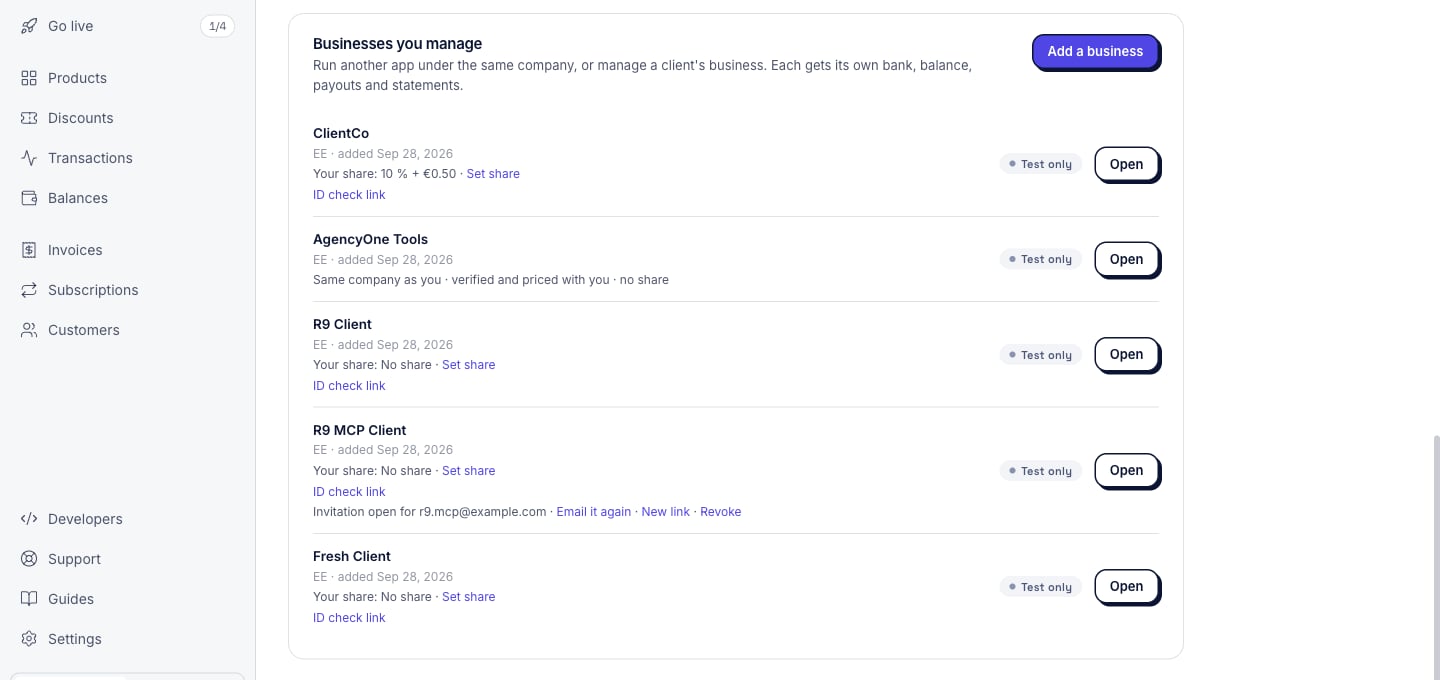
A business that a [platform](/connect/overview) manages goes through the same two checks. The platform can file the business review for its client, and our reviewers see that the platform filed it. The identity check is the client's own: the platform gets an **ID check link** and sends it, and only the client can complete it. The platform finds the link in **Settings**, on the **Business** tab, under **Businesses you manage**. When the check passes, the row shows **Identity verified**. Another app of the same company is verified with that company: we review only its product, and it has no identity check of its own.
When you have money to pay out, a message about the check shows on **Home** and at the top of every **Balances** tab. Click **Verify and get paid** to open the check. When you finish, the check returns you to the **Payouts** tab on **Balances**.
### Check status messages
The same message on **Home** and **Balances** tells you where your check is:
| Where the check is | The message | The button |
| - | - | - |
| Not started, with money to pay out | Names your balance and what the check takes | **Verify and get paid** |
| Started, not finished | **Picking up where you left off** | **Continue** opens the same check again |
| Submitted | **Checking your documents now**, "This usually takes a few minutes" | None |
| Did not go through | Says your money is safe and still yours | **Try again** |
| Passed | Says "We’ll pay" and the name we pay | None |
If you request a payout before the check passes, we keep the request. The payout goes out in the first payout run after the check passes, and you do not need to request it again. See [Payouts](/payouts/overview) for the payout schedule.
The confirmation names who we pay. Read that name. If it is wrong, contact support before your first payout. For a company, the ID names its owner and we pay the company. That difference is expected.
### Identity check emails
| Subject | When we send it |
| - | - |
| The amount, then "is waiting on one boring step" | You have money to pay out and the check has not passed. We send it a few days before each payout run, at most twice a month. |
| Your money is safe, we just need to try that check again | The check did not go through. |
### If the check does not go through
The usual cause is a blurry photo or a document the check cannot read. Click **Try again** to do the check again. If it still does not go through, reply to the email and a person works it out with you.
### If you cannot use the identity check
Some people cannot use the check: for example, a person with no phone that has a camera, or with a document the check does not read. Contact support. A person then confirms your identity another way. A person's confirmation counts the same as the automatic check.
## Payout accounts and your name
The holder name on your payout account should match your verified legal name. When you save a payout account, a separate name check compares the name with your bank's records. See [Add a payout account](/payouts/payout-accounts) for its labels and what to do about each one.
## Businesses managed by a platform
A business that a [platform](/connect/overview) manages goes through the same two checks. The platform can file the business review for its client, and our reviewers see that the platform filed it. The identity check is the client's own: the platform gets an **ID check link** and sends it, and only the client can complete it. The platform finds the link in **Settings**, on the **Business** tab, under **Businesses you manage**. When the check passes, the row shows **Identity verified**. Another app of the same company is verified with that company: we review only its product, and it has no identity check of its own.
 ## From code
* **Business review**: `agenta verify` submits it, shows its status, and sends it back after changes. See [Verify](/cli/verify).
* **Identity check for a client**: a platform gets the client's link with a live key. See [Create a verification link](/api-reference/businesses/verification-link).
## Next steps
The checklist we review against, and the common reasons for a change request.
Every step from test mode to your first live payment.
## From code
* **Business review**: `agenta verify` submits it, shows its status, and sends it back after changes. See [Verify](/cli/verify).
* **Identity check for a client**: a platform gets the client's link with a live key. See [Create a verification link](/api-reference/businesses/verification-link).
## Next steps
The checklist we review against, and the common reasons for a change request.
Every step from test mode to your first live payment.